VINTAGE TEXTURE EFFECT PLUGIN
SWING TEXTURE
時代を超える、音の質感。The texture of sound, across the decades.Die Textur des Klangs – über Jahrzehnte hinweg.La textura del sonido, a través de las décadas.La texture du son, à travers les décennies.A textura do som, através das décadas.시대를 넘나드는 소리의 질감.跨越年代的声音质感。跨越年代的聲音質感。
レコード、テープ、蓄音機、ラジオ。1920年代から1980年代までの音の手ざわりを、ひとつのプラグインで。エレクトロスウィングはもちろん、ローファイ・ヒップホップ、シティポップ、ヴェイパーウェイヴにも。Records, tape, gramophones, radio: the feel of sound from the 1920s to the 1980s, in one plugin. A natural fit for electro swing, as well as lo-fi hip hop, city pop, and vaporwave.Schallplatte, Tonband, Grammofon, Radio: der Klangcharakter der 1920er- bis 1980er-Jahre in einem einzigen Plugin. Passt natürlich zu Electro Swing, aber auch zu Lo-Fi-Hip-Hop, City Pop und Vaporwave.Discos, cinta, gramófonos, radio: el carácter sonoro desde la década de 1920 hasta la de 1980, en un solo plugin. Ideal para el electro swing, por supuesto, pero también para el lo-fi hip hop, el city pop y el vaporwave.Disques, bande magnétique, gramophones, radio : le caractère sonore des années 1920 aux années 1980, dans un seul plugin. Idéal pour l’electro swing, bien sûr, mais aussi pour le lo-fi hip-hop, la city pop et la vaporwave.Discos, fita, gramofones, rádio: o caráter sonoro da década de 1920 à década de 1980, em um único plugin. Ideal para electro swing, claro, mas também para lo-fi hip hop, city pop e vaporwave.레코드, 테이프, 축음기, 라디오. 1920s부터 1980s까지의 소리의 촉감을 하나의 플러그인에 담았습니다. 일렉트로 스윙은 물론, 로파이 힙합, 시티 팝, 베이퍼웨이브에도 잘 어울립니다.唱片、磁带、留声机、收音机。把 1920s 到 1980s 的声音质感,集于一个插件。不仅适合电子摇摆,也同样适合 Lo-fi Hip Hop、City Pop 和 Vaporwave。唱片、磁帶、留聲機、收音機。將 1920s 到 1980s 的聲音質感,集於一個外掛程式。不僅適合電子搖擺,也同樣適合 Lo-fi Hip Hop、City Pop 和 Vaporwave。
Produced by DYES IWASAKI
発売記念価格4,980円(税別)Launch price ¥4,980 (excl. tax)Einführungspreis ¥4.980 (zzgl. Steuern)Precio de lanzamiento ¥4.980 (sin impuestos)Prix de lancement 4 980 ¥ (hors taxes)Preço de lançamento ¥4.980 (sem impostos)발매 기념 가격 ¥4,980 (세금 별도)发售纪念价 4,980 日元(不含税)發售紀念價 4,980 日圓(未稅)
2026年12月17日まで。以降の通常価格は7,980円(税別)です。日本からのご購入には消費税10% が加わります(5,478円/8,778円)。Until December 17, 2026. Regular price afterwards: ¥7,980 (excl. tax). Applicable taxes (such as VAT) may be added at checkout depending on your country. Purchases from Japan are subject to 10% consumption tax (¥5,478 at the launch price / ¥8,778 at the regular price, including tax).Bis zum 17. Dezember 2026. Danach beträgt der reguläre Preis ¥7.980 (zzgl. Steuern). Je nach Land können beim Bezahlen Steuern (z. B. Mehrwertsteuer) hinzukommen. Bei Käufen aus Japan kommen 10 % japanische Verbrauchsteuer hinzu (5.478 ¥ zum Einführungspreis / 8.778 ¥ zum regulären Preis, jeweils inklusive Steuer).Hasta el 17 de diciembre de 2026. Después, el precio normal será de ¥7.980 (sin impuestos). Según su país, al pagar se pueden añadir impuestos (como el IVA). A las compras realizadas desde Japón se les añade un impuesto al consumo del 10 % (5.478 yenes con el precio de lanzamiento / 8.778 yenes con el precio normal, impuestos incluidos).Jusqu’au 17 décembre 2026. Ensuite, le prix normal sera de 7 980 ¥ (hors taxes). Selon votre pays, des taxes (telles que la TVA) peuvent s’ajouter au moment du paiement. Pour les achats effectués depuis le Japon, une taxe sur la consommation de 10 % s’ajoute (5 478 ¥ au prix de lancement / 8 778 ¥ au prix normal, taxe comprise).Até 17 de dezembro de 2026. Depois, o preço normal será de ¥7.980 (sem impostos). Dependendo do seu país, impostos (como IVA) podem ser acrescentados no pagamento. Nas compras feitas a partir do Japão, é acrescentado o imposto sobre o consumo de 10% (¥5.478 no preço de lançamento / ¥8.778 no preço normal, com imposto incluído).2026년 12월 17일까지. 이후 정가는 ¥7,980(세금 별도)입니다. 국가에 따라 결제 시 세금(부가가치세 등)이 추가될 수 있습니다. 일본에서 구매하시는 경우 소비세 10%가 추가됩니다(세금 포함 발매 기념 가격 5,478엔 / 정가 8,778엔).截至 2026 年 12 月 17 日。之后的正常价格为 7,980 日元(不含税)。根据您所在的国家或地区,结账时可能会加收税费(如增值税)。从日本购买时需加收 10% 的消费税(含税发售纪念价为 5,478 日元,含税正常价格为 8,778 日元)。至 2026 年 12 月 17 日為止。之後的正常價格為 7,980 日圓(未稅)。依您所在的國家或地區,結帳時可能會加收稅金(例如加值稅)。從日本購買時需加收 10% 的消費稅(含稅發售紀念價為 5,478 日圓,含稅正常價格為 8,778 日圓)。
購入特典:DYES IWASAKIのプリセット20本Purchase bonus: 20 presets by DYES IWASAKIKaufbonus: 20 Presets von DYES IWASAKIBonificación de compra: 20 presets de DYES IWASAKIBonus d’achat : 20 presets de DYES IWASAKIBônus de compra: 20 presets de DYES IWASAKI구매 특전: DYES IWASAKI의 프리셋 20종购买特典:DYES IWASAKI 的 20 个预设購買特典:DYES IWASAKI 的 20 個預設
BUY購入するBuyKaufenComprarAcheterComprar구매하기购买購買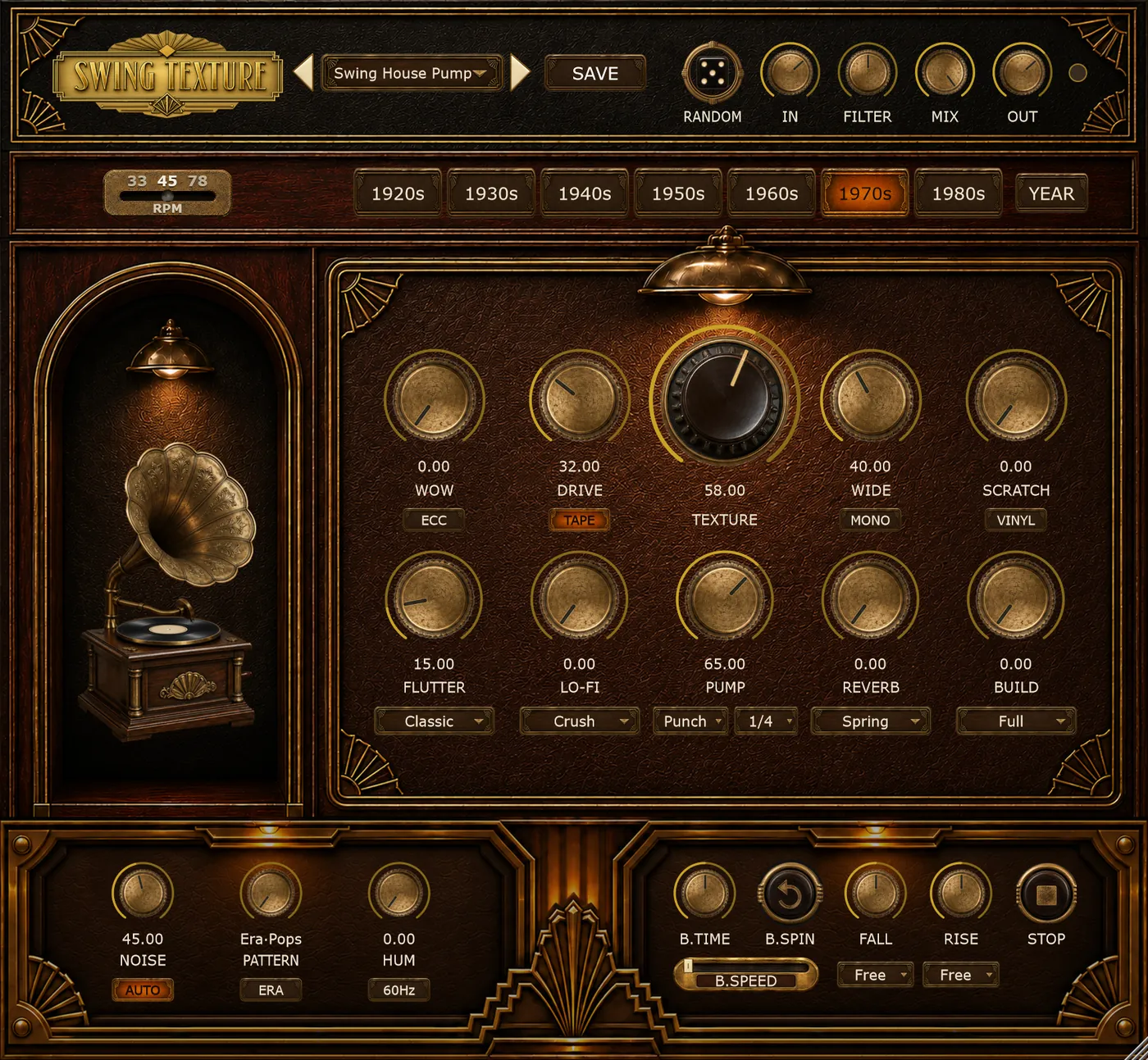
エレクトロスウィングの作り手が、毎日使う道具The tool an electro swing producer uses every dayDas Werkzeug, das ein Electro-Swing-Produzent jeden Tag benutztLa herramienta que un productor de electro swing usa cada díaL’outil qu’un producteur d’electro swing utilise tous les joursA ferramenta que um produtor de electro swing usa todos os dias일렉트로 스윙 제작자가 매일 쓰는 도구电子摇摆(Electro Swing)制作人每天都在用的工具電子搖擺(Electro Swing)製作人每天都在用的工具
SwingTextureは、エレクトロスウィングを作り続ける中で、
「古いレコードの空気を、手早く、狙いどおりに足したい」と思って作ったプラグインです。
理想の音が出るまで耳で詰め、実際の楽曲制作でも使っています。SwingTexture grew out of years of making electro swing. The aim was a fast, precise way to add the air of an old record; it was tuned by ear until it sounded right, and DYES IWASAKI also uses it in his own music production.SwingTexture entstand aus Jahren im Electro Swing. Ziel war es, die Atmosphäre alter Schallplatten schnell und gezielt hinzuzufügen; das Plugin wurde nach Gehör abgestimmt, bis es genau richtig klang, und wird von DYES IWASAKI auch in seiner eigenen Musikproduktion verwendet.SwingTexture nació de años haciendo electro swing. La idea era añadir con rapidez y precisión el aire de un disco antiguo; se afinó de oído hasta que sonó como debía y DYES IWASAKI también lo utiliza en su propia producción musical.SwingTexture est né d’années passées à faire de l’electro swing. L’idée était d’ajouter rapidement et précisément l’air d’un vieux disque ; il a été réglé à l’oreille jusqu’à obtenir le bon son, et DYES IWASAKI l’utilise également dans sa propre production musicale.O SwingTexture nasceu de anos fazendo electro swing. A ideia era acrescentar com rapidez e precisão o ar de um disco antigo; o plugin foi ajustado de ouvido até soar do jeito certo e DYES IWASAKI também o utiliza em sua própria produção musical.SwingTexture는 일렉트로 스윙을 계속 만들면서 “오래된 레코드의 분위기를 빠르게, 의도한 대로 더하고 싶다”는 생각으로 만든 플러그인입니다. 이상적인 소리가 날 때까지 귀로 다듬었고, 실제 곡 작업에서도 사용하고 있습니다.SwingTexture 诞生于持续创作电子摇摆的过程中:为了“快速、精准地加入老唱片的氛围”,一直凭耳朵打磨,直到得到理想的声音。实际的作品制作中也在使用它。SwingTexture 誕生於持續創作電子搖擺的過程中:為了「快速、精準地加入老唱片的氛圍」,一直憑耳朵打磨,直到得到理想的聲音。實際的作品製作中也在使用它。
できることWhat it doesWas es kannQué puede hacerCe qu’il permetO que ele faz할 수 있는 일功能功能
-
年代を選ぶだけで、その時代の音にPick a decade, get its soundEin Jahrzehnt wählen – und schon klingt es nach dieser ZeitElija una década y obtenga su sonidoChoisissez une décennie, retrouvez sa sonoritéEscolha uma década e obtenha o som dela시대를 고르기만 하면 그 시대의 소리로只需选择年代,就能得到那个年代的声音只要選擇年代,就能得到那個年代的聲音
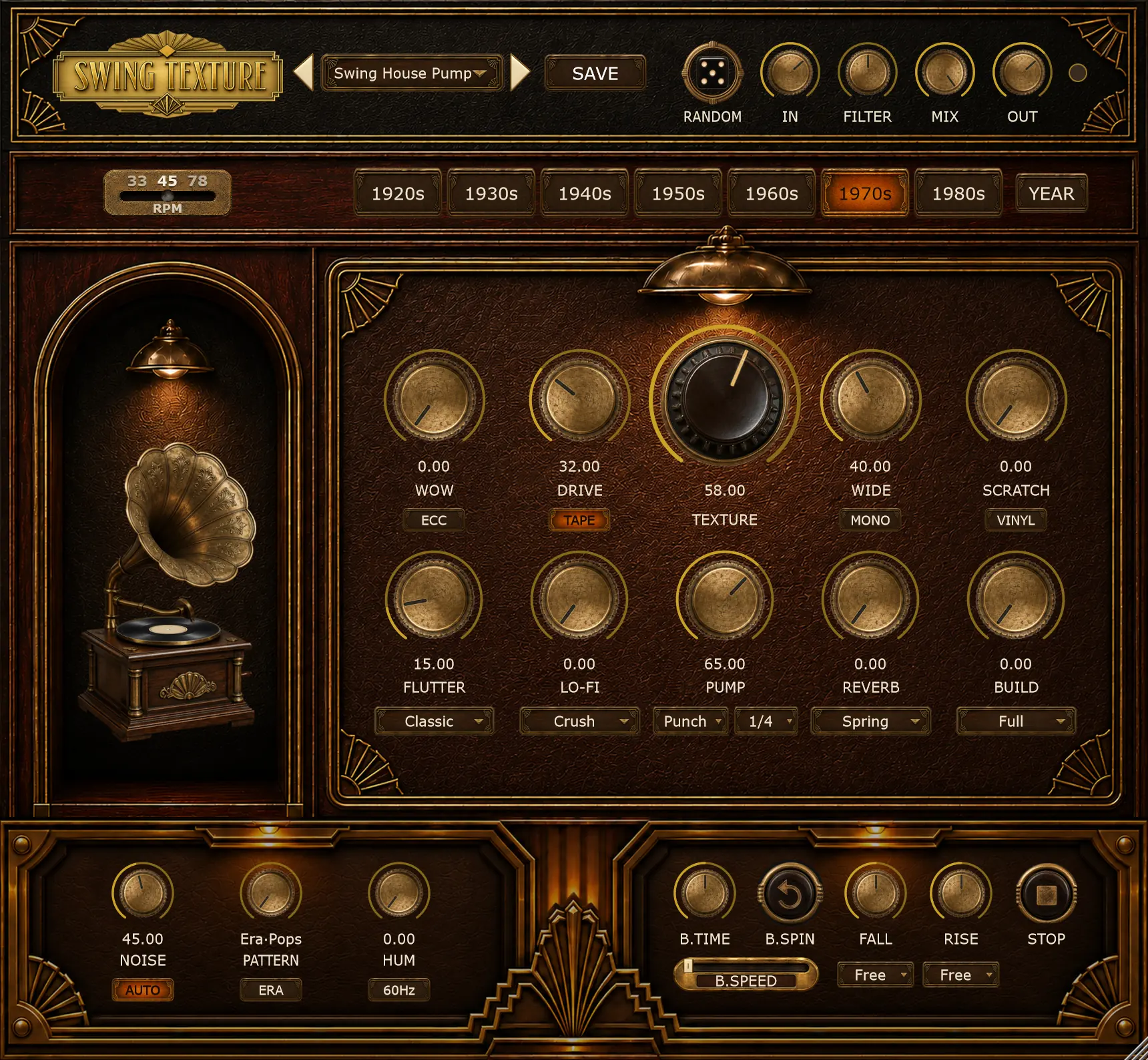
1920s〜1980sの年代ボタン。帯域、歪み、揺れ、ステレオ幅がまとめて変わります。濃さはTEXTUREノブひとつで調整。
YEARを押せばYEARダイヤルに切り替わり、1920〜1980年を1年刻みで細かく選べます(ボタンに戻すときはERA)。Era buttons from the 1920s to the 1980s change bandwidth, saturation, wobble and stereo width together. One TEXTURE knob sets how deep it goes. Press YEAR to switch to the YEAR dial and choose any year from 1920 to 1980, in one-year steps (press ERA to go back).Ära-Tasten von den 1920er- bis zu den 1980er-Jahren verändern gemeinsam Bandbreite, Sättigung, Schwankungen und Stereobreite. Ein einziger TEXTURE-Regler bestimmt, wie stark der Effekt greift. Mit YEAR wechseln Sie zum YEAR-Regler und wählen jedes Jahr von 1920 bis 1980 in Ein-Jahres-Schritten (zurück mit ERA).Los botones de época, de la década de 1920 a la de 1980, cambian a la vez el ancho de banda, la saturación, la oscilación y el ancho estéreo. Una sola perilla TEXTURE regula cuánto se aplica. Pulse YEAR para cambiar al dial YEAR y elegir cualquier año de 1920 a 1980, en pasos de un año (ERA para volver).Les boutons d’époque, des années 1920 aux années 1980, modifient ensemble la bande passante, la saturation, les fluctuations et la largeur stéréo. Un seul bouton TEXTURE règle l’intensité. Appuyez sur YEAR pour passer au cadran YEAR et choisir n’importe quelle année de 1920 à 1980, par pas d’un an (ERA pour revenir).Botões de época da década de 1920 à década de 1980 alteram juntos a largura de banda, a saturação, a oscilação e a largura estéreo. Um único knob TEXTURE define a intensidade. Toque em YEAR para mudar para o dial YEAR e escolher qualquer ano de 1920 a 1980, em passos de um ano (ERA para voltar).1920s~1980s의 시대 버튼. 대역, 왜곡, 흔들림, 스테레오 폭이 한꺼번에 바뀝니다. 효과의 강도는 TEXTURE 노브 하나로 조절합니다. YEAR를 누르면 YEAR 다이얼로 바뀌어 1920~1980년을 1년 단위로 세밀하게 고를 수 있습니다(버튼으로 되돌릴 때는 ERA).从 1920s 到 1980s 的年代按钮,频带、失真、抖晃和立体声宽度会一起变化。只需一个 TEXTURE 旋钮即可调节效果强度。 按下 YEAR 即可切换为 YEAR 旋钮,以 1 年为单位在 1920 至 1980 年之间细调(切回按钮时按 ERA)。從 1920s 到 1980s 的年代按鈕,頻寬、失真、晃動與立體聲寬度會一起變化。只需一個 TEXTURE 旋鈕即可調整效果強度。 按下 YEAR 即可切換為 YEAR 旋鈕,以 1 年為單位在 1920 至 1980 年之間細調(切回按鈕時按 ERA)。

-
レコードとテープの揺れRecord and tape wobbleSchwankungen von Schallplatte und TonbandOscilación de disco y de cintaFluctuations du disque et de la bandeOscilação de disco e de fita레코드와 테이프의 흔들림唱片与磁带的抖晃唱片與磁帶的晃動
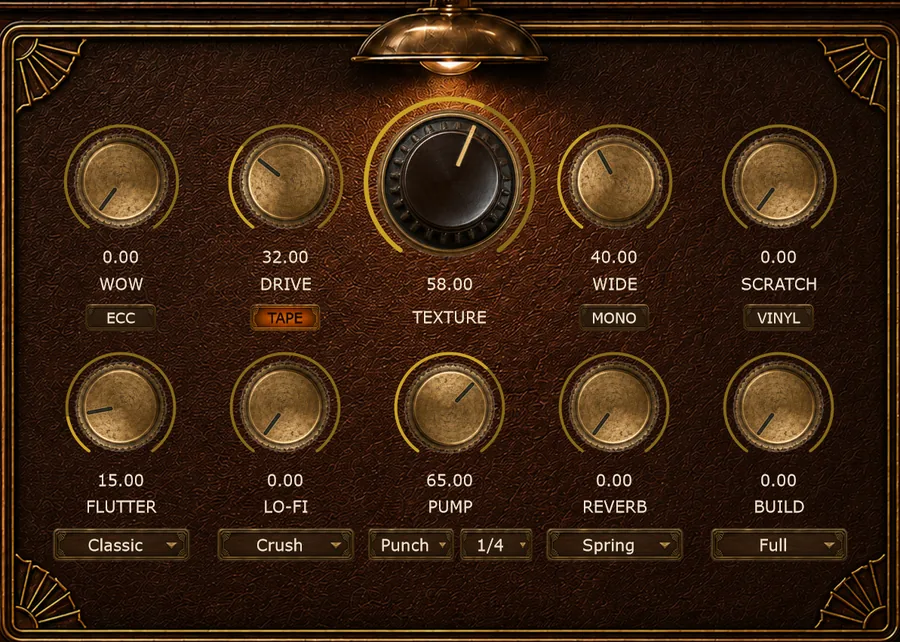
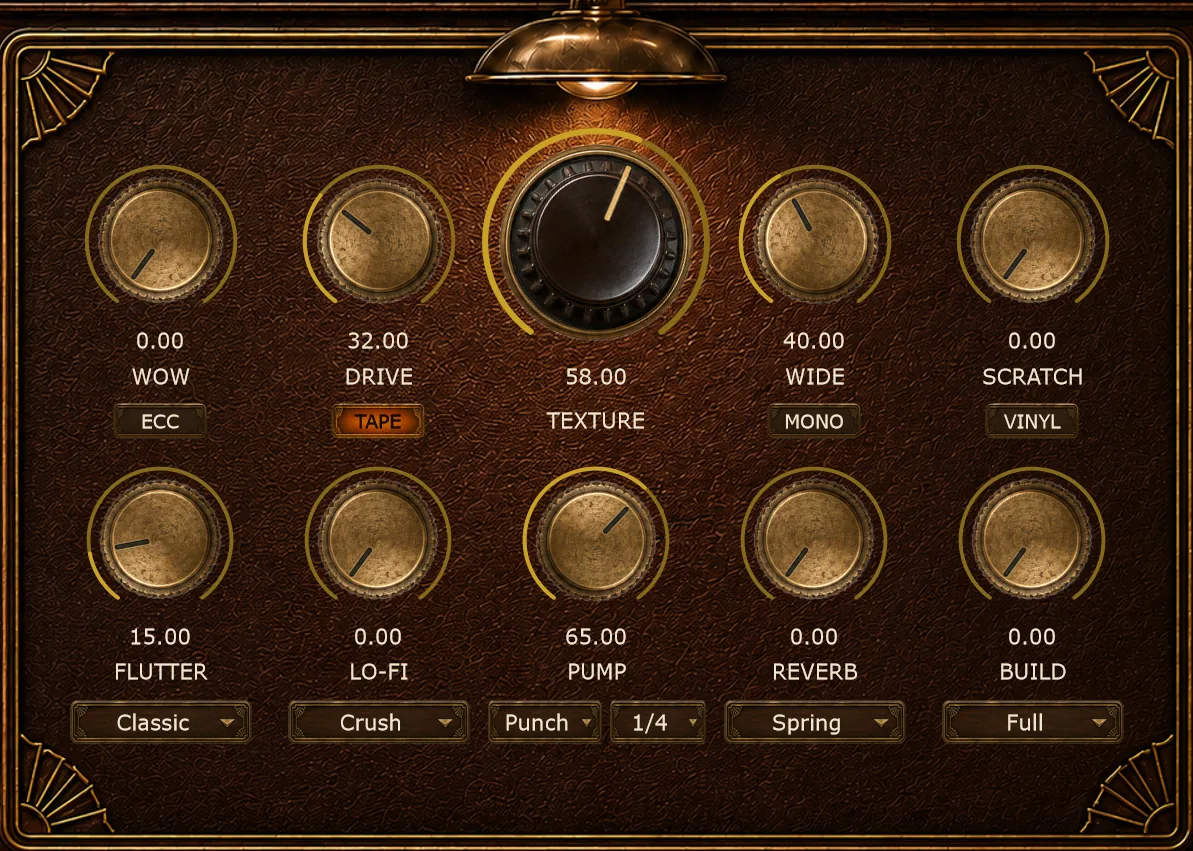
盤の偏心や反りのようなWOW、テープの細かな揺れのFLUTTER(3タイプ)。回転数(33/45/78)にも連動します。WOW for off-center or warped records, FLUTTER (3 types) for fine tape movement, linked to 33 / 45 / 78 rpm.WOW für außermittige oder verzogene Platten, FLUTTER (3 Typen) für feine Bandschwankungen – gekoppelt an 33 / 45 / 78 rpm.WOW para recrear las fluctuaciones de un disco descentrado o alabeado y FLUTTER (3 tipos) para las pequeñas fluctuaciones de velocidad de la cinta, vinculados a 33 / 45 / 78 rpm.WOW pour les disques décentrés ou voilés, FLUTTER (3 types) pour les fines fluctuations de la bande, liés à 33 / 45 / 78 rpm.WOW para recriar as oscilações de discos descentrados ou empenados e FLUTTER (3 tipos) para pequenas flutuações na velocidade da fita, vinculados a 33 / 45 / 78 rpm.음반의 편심이나 휨 같은 WOW, 테이프의 잔잔한 흔들림 FLUTTER(3종류). 회전수(33/45/78)와도 연동됩니다.模拟唱片偏心或翘曲的 WOW,以及磁带细微抖动的 FLUTTER(3 种类型)。同时与转速(33/45/78)联动。模擬唱片偏心或翹曲的 WOW,以及磁帶細微抖動的 FLUTTER(3 種類型)。同時與轉速(33/45/78)連動。
-
ノイズと傷Noise and scratchesRauschen und KratzerRuido y arañazosBruit et rayuresRuído e arranhões노이즈와 스크래치噪声与划痕雜訊與刮痕
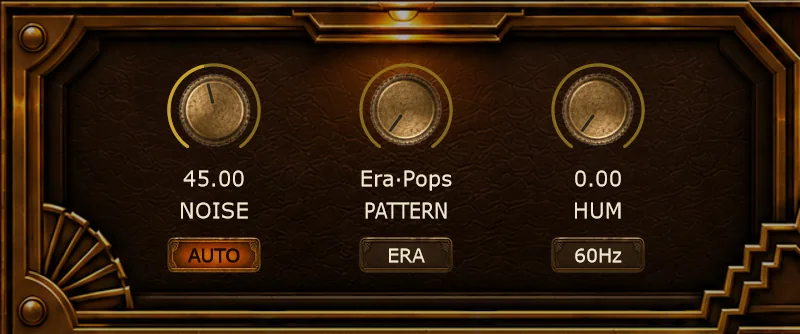
針音・ヒス・ラジオなど、Autoを含む18種類のノイズ、4種類のスクラッチ(VINYL/SP/WORN/GROOVE)、電源ハム(50/60Hz)。18 noise patterns including Auto (crackle, hiss, radio and more), 4 scratch types (VINYL / SP / WORN / GROOVE) and mains hum (50 / 60 Hz).18 Rauschmuster einschließlich Auto (Knistern, Zischen, Radio und mehr), 4 Kratzertypen (VINYL / SP / WORN / GROOVE) und Netzbrummen (50 / 60 Hz).18 patrones de ruido, incluido Auto (crujidos, siseo, radio y más), 4 tipos de arañazos (VINYL / SP / WORN / GROOVE) y zumbido de red (50 / 60 Hz).18 motifs de bruit, dont Auto (craquements, souffle, radio et plus), 4 types de rayures (VINYL / SP / WORN / GROOVE) et ronflement du secteur (50 / 60 Hz).18 padrões de ruído, incluindo Auto (estalos, chiado, rádio e mais), 4 tipos de arranhões (VINYL / SP / WORN / GROOVE) e zumbido da rede elétrica (50 / 60 Hz).바늘 소리·히스·라디오 등 Auto를 포함한 18종류의 노이즈, 4종류의 스크래치(VINYL/SP/WORN/GROOVE), 전원 험(50/60Hz).唱针声、嘶声、收音机声等,包括 Auto 在内共 18 种噪声,4 种划痕(VINYL/SP/WORN/GROOVE),以及电源嗡声(50/60Hz)。唱針聲、嘶聲、收音機聲等,包含 Auto 在內共 18 種雜訊,4 種刮痕(VINYL/SP/WORN/GROOVE),以及電源嗡聲(50/60Hz)。
-
色づけColorKlangfärbungColorCouleurCor색 입히기上色上色
TUBE/TAPEの2種類の歪み(DRIVE)、蓄音機・電話・AMラジオ越しにするLO-FI、6種類のリバーブ。Two saturation types (TUBE / TAPE) in the DRIVE section, LO-FI through a gramophone horn, telephone or AM radio, and 6 reverb types.Zwei Sättigungstypen (TUBE / TAPE) im DRIVE-Bereich, LO-FI wie durch einen Grammofontrichter, ein Telefon oder ein AM-Radio und 6 Nachhall-Typen.Dos tipos de saturación (TUBE / TAPE) en la sección DRIVE, LO-FI como a través de la bocina de un gramófono, un teléfono o una radio AM, y 6 tipos de reverb.Deux types de saturation (TUBE / TAPE) dans la section DRIVE, LO-FI comme à travers le pavillon d’un gramophone, un téléphone ou une radio AM, et 6 types de réverbération.Dois tipos de saturação (TUBE / TAPE) na seção DRIVE, LO-FI como se fosse pela corneta de um gramofone, por um telefone ou por um rádio AM, e 6 tipos de reverb.TUBE/TAPE 2종류의 왜곡(DRIVE), 축음기·전화기·AM 라디오를 거친 듯한 LO-FI, 6종류의 리버브.TUBE/TAPE 两种失真(DRIVE),仿佛透过留声机喇叭、电话或 AM 收音机的 LO-FI,以及 6 种混响。TUBE/TAPE 兩種失真(DRIVE),彷彿透過留聲機喇叭、電話或 AM 收音機的 LO-FI,以及 6 種殘響。
-
展開を作るBuild the arrangementSpannung aufbauenConstruya el arregloConstruire l’arrangementConstrua o arranjo전개 만들기打造编曲的起伏打造編曲的起伏
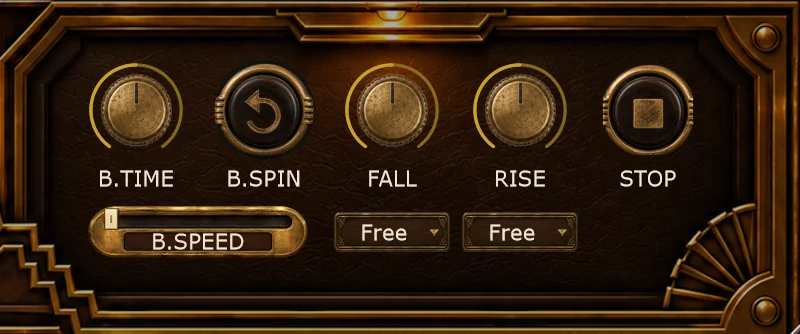
テープストップ(STOP/RISE)、バックスピン(B.SPIN)、ノブひとつのライザー(BUILD)、テンポ同期のサイドチェイン風ポンプ(PUMP)、DJフィルター。テンポに合わせた長さ指定や、MIDIノート(C1/D1/E1/G1)での操作にも対応。Tape stop (STOP / RISE), record backspin (B.SPIN), a one-knob riser (BUILD), a tempo-synced sidechain-style PUMP, and a DJ filter. Times can follow the song tempo, and C1 / D1 / E1 / G1 MIDI notes can trigger the effects.Tape Stop (STOP / RISE), Backspin wie bei einer Schallplatte (B.SPIN), ein Riser mit nur einem Regler (BUILD), ein tempo-synchrones PUMP im Sidechain-Stil und ein DJ-Filter. Die Zeiten können dem Songtempo folgen, und die MIDI-Noten C1 / D1 / E1 / G1 können die Effekte auslösen.Parada de cinta (STOP / RISE), backspin de disco (B.SPIN), un riser de una sola perilla (BUILD), un PUMP sincronizado con el tempo al estilo sidechain y un filtro de DJ. Los tiempos pueden seguir el tempo de la canción, y las notas MIDI C1 / D1 / E1 / G1 pueden activar los efectos.Arrêt de bande (STOP / RISE), backspin de disque (B.SPIN), un riser à un seul bouton (BUILD), un PUMP synchronisé au tempo façon sidechain et un filtre DJ. Les durées peuvent suivre le tempo du morceau, et les notes MIDI C1 / D1 / E1 / G1 peuvent déclencher les effets.Parada de fita (STOP / RISE), backspin de disco (B.SPIN), um riser de um só knob (BUILD), um PUMP sincronizado com o andamento no estilo sidechain e um filtro de DJ. Os tempos podem acompanhar o andamento da música, e as notas MIDI C1 / D1 / E1 / G1 podem acionar os efeitos.테이프 스톱(STOP/RISE), 백스핀(B.SPIN), 노브 하나로 만드는 라이저(BUILD), 템포에 동기화되는 사이드체인 스타일의 펌핑 효과(PUMP), DJ 필터. 템포에 맞춘 길이 지정과 MIDI 노트(C1/D1/E1/G1) 조작도 지원합니다.磁带停止(STOP/RISE)、倒转唱片(B.SPIN)、单旋钮控制的上升音效(BUILD)、与速度同步的侧链式 PUMP,以及 DJ 滤波器。可按曲速指定时长,也支持用 MIDI 音符(C1/D1/E1/G1)操作。磁帶停止(STOP/RISE)、倒轉唱片(B.SPIN)、單旋鈕控制的上升音效(BUILD)、與速度同步的側鏈式 PUMP,以及 DJ 濾波器。可依曲速指定時長,也支援以 MIDI 音符(C1/D1/E1/G1)操作。
-
解説モードHelp modeHilfemodusModo de ayudaMode d’aideModo de ajuda해설 모드解说模式解說模式
ノブやボタンにマウスを乗せると、その部品の名前・働き・使いどころを
プラグインの画面の中で解説します。
説明書を開かなくても、触りながら覚えられます。
解説は9言語に対応。Hover over a knob or button to see its name, what it does, and when to use it, directly in the plugin interface. Learn by adjusting the controls without opening the manual. Explanations are available in 9 languages.Bewegen Sie den Mauszeiger über einen Regler oder eine Taste. Direkt im Plugin werden der Name, die Funktion und die Einsatzmöglichkeiten des jeweiligen Bedienelements erklärt. So lernen Sie die Bedienung beim Ausprobieren, ohne das Handbuch öffnen zu müssen. Die Erklärungen sind in 9 Sprachen verfügbar.Pase el ratón sobre una perilla o un botón para ver su nombre, su función y cuándo utilizarlo, directamente en la interfaz del plugin. Aprenda a utilizar los controles mientras los prueba, sin abrir el manual. Las explicaciones están disponibles en 9 idiomas.Survolez un bouton rotatif ou un bouton de commande pour afficher son nom, sa fonction et ses cas d’utilisation directement dans l’interface du plugin. Apprenez à utiliser les commandes en les manipulant, sans ouvrir le manuel. Les explications sont disponibles en 9 langues.Passe o mouse sobre um knob ou botão para ver seu nome, sua função e quando usá-lo, diretamente na interface do plugin. Aprenda a usar os controles enquanto experimenta, sem abrir o manual. As explicações estão disponíveis em 9 idiomas.노브나 버튼에 마우스를 올리면 그 부품의 이름·역할·쓰임새를 플러그인 화면 안에서 해설해 줍니다. 설명서를 열지 않아도 만져 보며 익힐 수 있습니다. 해설은 9개 언어를 지원합니다.把鼠标悬停在旋钮或按钮上,插件就会在界面内讲解该部件的名称、作用和使用场景。无需打开说明书,就能在操作过程中逐步掌握用法。解说支持 9 种语言。將滑鼠停在旋鈕或按鈕上,外掛程式就會在畫面內講解該零件的名稱、作用與使用時機。不必打開說明書,就能在操作過程中逐步掌握用法。解說支援 9 種語言。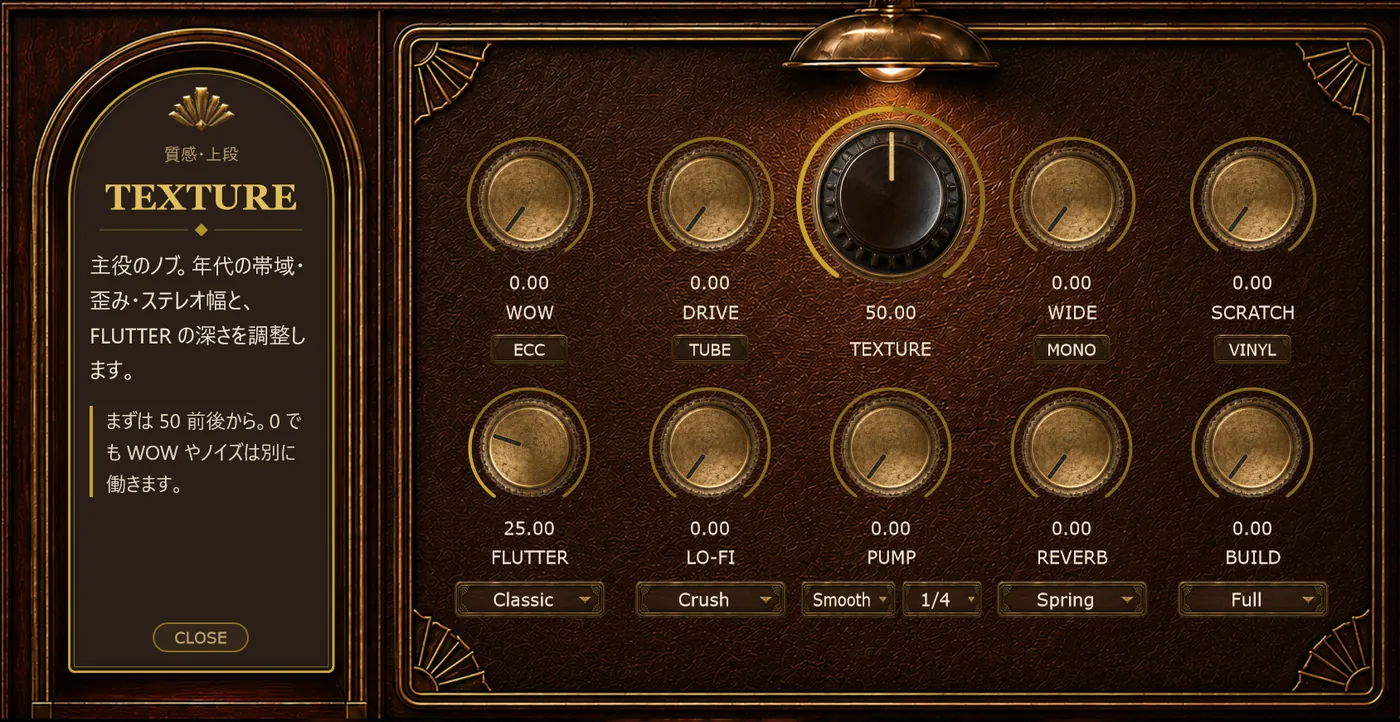
-
すぐ使えるReady to goSofort einsatzbereitListo para usarPrêt à l’emploiPronto para usar바로 쓸 수 있습니다开箱即用開箱即用
ファクトリープリセット21本と、ユーザープリセットの保存。RANDOMを押せば、音楽的な範囲でまとめて振れます(右クリックで戻せます)。
購入特典として、DYES IWASAKIのプリセット20本が付きます。
プリセット一覧のPACKS > DYES IWASAKIから選べます。Includes 21 factory presets and lets you save your own user presets. Press RANDOM to randomize settings together within a musical range (right-click to undo). Purchase bonus: 20 presets by DYES IWASAKI are included. Find them in the preset list under PACKS > DYES IWASAKI.21 Werks-Presets und die Möglichkeit, eigene Presets zu speichern. Mit RANDOM werden mehrere Einstellungen gleichzeitig innerhalb musikalisch sinnvoller Grenzen zufällig verändert (per Rechtsklick rückgängig zu machen). Als Kaufbonus sind 20 Presets von DYES IWASAKI enthalten. Sie stehen in der Preset-Liste unter PACKS > DYES IWASAKI.Incluye 21 presets de fábrica y permite guardar sus propios presets. Pulse RANDOM para variar aleatoriamente varios ajustes a la vez dentro de un rango musicalmente útil (clic derecho para deshacer). Como bonificación de compra se incluyen 20 presets de DYES IWASAKI. Los encontrará en la lista de presets, en PACKS > DYES IWASAKI.21 presets d’usine et la possibilité de sauvegarder vos propres presets. Appuyez sur RANDOM pour faire varier aléatoirement plusieurs réglages à la fois dans des limites musicalement pertinentes (clic droit pour annuler). En bonus d’achat, 20 presets de DYES IWASAKI sont inclus. Vous les trouverez dans la liste des presets, sous PACKS > DYES IWASAKI.21 presets de fábrica e a possibilidade de salvar seus próprios presets. Clique em RANDOM para variar aleatoriamente vários ajustes de uma só vez dentro de limites musicalmente úteis (clique com o botão direito para desfazer). Como bônus de compra, 20 presets de DYES IWASAKI estão incluídos. Você os encontra na lista de presets, em PACKS > DYES IWASAKI.팩토리 프리셋 21개와 사용자 프리셋 저장. RANDOM을 누르면 음악적인 범위에서 한꺼번에 바꿔 줍니다(오른쪽 클릭으로 되돌릴 수 있습니다). 구매 특전으로 DYES IWASAKI의 프리셋 20종이 포함됩니다. 프리셋 목록의 PACKS > DYES IWASAKI에서 고를 수 있습니다.21 个出厂预设,并可保存用户预设。按下 RANDOM,即可在适合音乐创作的范围内同时随机调整多项参数(右键点击即可还原)。购买特典:附赠 DYES IWASAKI 的 20 个预设。可在预设列表的 PACKS > DYES IWASAKI 中选择。21 個出廠預設,並可儲存使用者預設。按下 RANDOM,即可在適合音樂創作的範圍內同時隨機調整多項參數(按右鍵即可還原)。購買特典:附贈 DYES IWASAKI 的 20 個預設。可在預設清單的 PACKS > DYES IWASAKI 中選擇。
デモ動画Demo videoDemovideoVídeo de demostraciónVidéo de démonstrationVídeo de demonstração데모 영상演示视频示範影片
説明書を読むRead the manualHandbuch lesenLeer el manualLire le manuelLer o manual설명서 읽기阅读说明书閱讀說明書
試聴音源Audio examplesHörbeispieleEjemplos de audioExemples audioExemplos de áudio미리 듣기 음원试听音源試聽音源
同じ演奏を、SwingTextureなし(BYPASS)とあり(WET)で聴き比べられます。
再生中に切り替えても、同じ位置から続けて聴けます。Hear the same performance without SwingTexture (BYPASS) and with it (WET). Switch while it plays and keep listening from the same position.Hören Sie dieselbe Darbietung ohne SwingTexture (BYPASS) und mit SwingTexture (WET). Sie können während der Wiedergabe umschalten und an derselben Stelle weiterhören.Escuche la misma interpretación sin SwingTexture (BYPASS) y con SwingTexture (WET). Puede cambiar mientras suena y seguir escuchando desde la misma posición.Écoutez la même interprétation sans SwingTexture (BYPASS) puis avec (WET). Vous pouvez basculer pendant la lecture et continuer à écouter à la même position.Ouça a mesma interpretação sem o SwingTexture (BYPASS) e com ele (WET). Você pode alternar durante a reprodução e continuar ouvindo da mesma posição.같은 연주를 SwingTexture 없이(BYPASS), 그리고 적용해서(WET) 비교해 들을 수 있습니다. 재생 중에 전환해도 같은 위치에서 이어서 들을 수 있습니다.可以对比聆听同一段演奏在未使用 SwingTexture(BYPASS)和使用后(WET)的效果。播放中切换,也会从同一位置继续播放。可以比較聆聽同一段演奏在未使用 SwingTexture(BYPASS)與使用後(WET)的效果。播放中切換,也會從同一個位置繼續播放。
ピアノPianoKlavierPianoPianoPiano피아노钢琴鋼琴
Preset: Parlor Piano
テナーサックスTenor saxTenorsaxofonSaxo tenorSaxophone ténorSax tenor테너 색소폰次中音萨克斯次中音薩克斯風
Preset: Brass Section Bite
Sax: Takahiro YamasakiSax: Takahiro YamasakiSax: Takahiro YamasakiSax: Takahiro YamasakiSax: Takahiro YamasakiSax: Takahiro YamasakiSax: Takahiro YamasakiSax: Takahiro YamasakiSax: Takahiro Yamasaki
アコーディオンAccordionAkkordeonAcordeónAccordéonAcordeão아코디언手风琴手風琴
Preset: 1930s Radio Days
マカフェリギターMaccaferri guitarMaccaferri-GitarreGuitarra MaccaferriGuitare MaccaferriViolão Maccaferri마카페리 기타马卡费里吉他馬卡費里吉他
Preset: Gypsy Guitar 1930s(購入特典)Preset: Gypsy Guitar 1930s (Purchase bonus)Preset: Gypsy Guitar 1930s (Kaufbonus)Preset: Gypsy Guitar 1930s (Bonificación de compra)Preset: Gypsy Guitar 1930s (Bonus d’achat)Preset: Gypsy Guitar 1930s (Bônus de compra)Preset: Gypsy Guitar 1930s (구매 특전)Preset: Gypsy Guitar 1930s (购买特典)Preset: Gypsy Guitar 1930s (購買特典)
ドラムDrumsSchlagzeugBateríaBatterieBateria드럼鼓鼓
Preset: 1970s Dusty Funk
ボーカルVocalsGesangVozVoixVocal보컬人声人聲
Preset: Vocal 1920s(購入特典)Preset: Vocal 1920s (Purchase bonus)Preset: Vocal 1920s (Kaufbonus)Preset: Vocal 1920s (Bonificación de compra)Preset: Vocal 1920s (Bonus d’achat)Preset: Vocal 1920s (Bônus de compra)Preset: Vocal 1920s (구매 특전)Preset: Vocal 1920s (购买特典)Preset: Vocal 1920s (購買特典)
Vocal: リリィミズサキVocal: Lily MizusakiVocal: Lily MizusakiVocal: Lily MizusakiVocal: Lily MizusakiVocal: Lily MizusakiVocal: Lily MizusakiVocal: Lily MizusakiVocal: Lily Mizusaki
シティポップCity popCity PopCity popCity popCity pop시티팝城市流行城市流行
Preset: 1960s Jukebox 45
ローファイ・ヒップホップLo-fi hip hopLo-Fi-Hip-HopLo-fi hip hopLo-fi hip-hopLo-fi hip hop로파이 힙합Lo-fi 嘻哈Lo-fi 嘻哈
Preset: 1980s Cassette
動きの実演(PUMP → テープストップ → バックスピン)In motion (PUMP → tape stop → backspin)In Bewegung (PUMP → Tape-Stop → Backspin)En movimiento (PUMP → tape stop → backspin)En mouvement (PUMP → tape stop → backspin)Em movimento (PUMP → tape stop → backspin)움직임 시연 (PUMP → 테이프 스톱 → 백스핀)动态演示(PUMP → 磁带停止 → 倒转)動態示範(PUMP → 磁帶停止 → 倒轉)
Preset: Swing House Pump
曲全体Full mixGesamtmixMezcla completaMix completMix completo곡 전체整首曲子整首曲子
Preset: 1950s Jazz LP
アーティストコメントArtist commentsStimmen von KünstlernComentarios de artistasAvis d’artistesComentários de artistas아티스트 코멘트艺术家评语藝術家評語
 TOPHAMHAT-KYOTOPHAMHAT-KYOTOPHAMHAT-KYOTOPHAMHAT-KYOTOPHAMHAT-KYOTOPHAMHAT-KYOTOPHAMHAT-KYOTOPHAMHAT-KYOTOPHAMHAT-KYOFAKE TYPE.FAKE TYPE.FAKE TYPE.FAKE TYPE.FAKE TYPE.FAKE TYPE.FAKE TYPE.FAKE TYPE.FAKE TYPE.
 ZERAZERAZERAZERAZERAZERAZERAZERAZERAボカロPVocaloid producerVocaloid producerVocaloid producerVocaloid producerVocaloid producerVocaloid producerVocaloid producerVocaloid producer
 なみぐるnamigroovenamigroovenamigroovenamigroovenamigroovenamigroovenamigroovenamigrooveボカロP/DJVocaloid producer / DJVocaloid producer / DJVocaloid producer / DJVocaloid producer / DJVocaloid producer / DJVocaloid producer / DJVocaloid producer / DJVocaloid producer / DJ
 zensenzensenzensenzensenzensenzensenzensenzensenzensenElectro Swing DJElectro Swing DJElectro Swing DJElectro Swing DJElectro Swing DJElectro Swing DJElectro Swing DJElectro Swing DJElectro Swing DJ
 ど〜ぱみんDopam!neDopam!neDopam!neDopam!neDopam!neDopam!neDopam!neDopam!neトラックメイカー/ボカロPTrack maker / Vocaloid producerTrack maker / Vocaloid producerTrack maker / Vocaloid producerTrack maker / Vocaloid producerTrack maker / Vocaloid producerTrack maker / Vocaloid producerTrack maker / Vocaloid producerTrack maker / Vocaloid producer
 JohngarabushiJohngarabushiJohngarabushiJohngarabushiJohngarabushiJohngarabushiJohngarabushiJohngarabushiJohngarabushiギタリストGuitaristGuitaristGuitaristGuitaristGuitaristGuitaristGuitaristGuitarist
動作環境RequirementsSystemvoraussetzungenRequisitosConfiguration requiseRequisitos동작 환경运行环境執行環境
- Windows(64bit)のみ(Mac版はありません)Windows (64-bit) only (no Mac version)Nur Windows (64 Bit) (keine Mac-Version)Solo Windows (64 bits) (no hay versión para Mac)Windows (64 bits) uniquement (pas de version Mac)Somente Windows (64 bits) (não há versão para Mac)Windows(64bit)만 지원(Mac 버전은 없습니다)仅支持 Windows(64 位)(没有 Mac 版)僅支援 Windows(64 位元)(沒有 Mac 版)
- 形式: VST3/StandaloneFormats: VST3 / StandaloneFormate: VST3 / StandaloneFormatos: VST3 / StandaloneFormats : VST3 / StandaloneFormatos: VST3 / Standalone형식: VST3/Standalone格式:VST3/Standalone格式:VST3/Standalone
- 動作確認済みDAW: Cubase 13〜/REAPER/Sonar/Ableton Live 12/FL Studio/Studio One/Bitwig StudioTested hosts: Cubase 13 or later, REAPER, Sonar, Ableton Live 12, FL Studio, Studio One, Bitwig StudioGetestete DAWs: Cubase ab Version 13, REAPER, Sonar, Ableton Live 12, FL Studio, Studio One, Bitwig StudioDAW probados: Cubase 13 o posterior, REAPER, Sonar, Ableton Live 12, FL Studio, Studio One, Bitwig StudioDAW testés : Cubase 13 ou version ultérieure, REAPER, Sonar, Ableton Live 12, FL Studio, Studio One, Bitwig StudioDAWs testadas: Cubase 13 ou posterior, REAPER, Sonar, Ableton Live 12, FL Studio, Studio One, Bitwig Studio동작 확인된 DAW: Cubase 13 이상/REAPER/Sonar/Ableton Live 12/FL Studio/Studio One/Bitwig Studio已确认可用的 DAW:Cubase 13 及以上/REAPER/Sonar/Ableton Live 12/FL Studio/Studio One/Bitwig Studio已確認可用的 DAW:Cubase 13 及以上/REAPER/Sonar/Ableton Live 12/FL Studio/Studio One/Bitwig Studio
よくある質問FAQHäufige FragenPreguntas frecuentesQuestions fréquentesPerguntas frequentes자주 묻는 질문常见问题常見問題
体験版はありますか?Is there a trial version?Gibt es eine Demoversion?¿Hay una versión de prueba?Existe-t-il une version d’essai ?Existe uma versão de demonstração?체험판이 있나요?有试用版吗?有試用版嗎?
体験版はありません。かける前と後を聴き比べられる試聴音源とデモ動画をご用意しています。ご購入から14日以内に、お使いの環境で正しく動作しなかった場合は返金します(下の「返金はできますか?」)。There is no trial version. Listen to the before/after audio examples and the demo video above. If it does not work correctly on your system within 14 days of purchase, you can get a refund (see "Refunds?" below).Es gibt keine Testversion. Hören Sie sich oben die Vorher-nachher-Hörbeispiele und das Demovideo an. Funktioniert das Plugin innerhalb von 14 Tagen nach dem Kauf auf Ihrem System nicht korrekt, ist eine Rückerstattung möglich (siehe „Rückerstattung?“ unten).No hay versión de prueba. Escuche arriba los ejemplos de audio de antes y después y el vídeo de demostración. Si no funciona correctamente en su sistema durante los 14 días posteriores a la compra, puede obtener un reembolso (vea «¿Reembolsos?» más abajo).Il n’y a pas de version d’essai. Écoutez ci-dessus les exemples audio avant/après et la vidéo de démonstration. Si le plugin ne fonctionne pas correctement sur votre système dans les 14 jours suivant l’achat, vous pouvez obtenir un remboursement (voir « Remboursements ? » ci-dessous).Não há versão de teste. Ouça acima os exemplos de áudio de antes e depois e o vídeo de demonstração. Se o plugin não funcionar corretamente no seu sistema nos primeiros 14 dias após a compra, você poderá receber o reembolso (veja «Reembolsos?» abaixo).체험판은 없습니다. 적용 전후를 비교해 들을 수 있는 미리 듣기 음원과 데모 영상을 준비했습니다. 구매 후 14일 이내에 사용 중인 환경에서 정상 작동하지 않으면 환불해 드립니다(아래 “환불이 가능한가요?” 참조).没有试用版。我们准备了可对比使用前后效果的试听音源和演示视频。购买后 14 天内,如果在您的环境中无法正常运行,我们将为您退款(见下方“可以退款吗?”)。沒有試用版。我們準備了可比較使用前後效果的試聽音源與示範影片。購買後 14 天內,如果在您的環境中無法正常執行,我們將為您退款(見下方「可以退款嗎?」)。
アップデートは無料ですか?Are updates free?Sind Updates kostenlos?¿Las actualizaciones son gratuitas?Les mises à jour sont-elles gratuites ?As atualizações são gratuitas?업데이트는 무료인가요?更新是免费的吗?更新是免費的嗎?
v1.xのアップデートは無料です。新しい版が出ると、プラグインの画面に「Update available」と表示されます(1日1回確認。オフにできます。自動で更新はしません)。将来の大きな改版(v2)は有料になる場合があります。All v1.x updates are free. When a new version is out, the plugin shows "Update available" (checked once a day, can be turned off, never installs anything automatically). A future major version (v2) may be a paid upgrade.Alle v1.x-Updates sind kostenlos. Ist eine neue Version verfügbar, zeigt das Plugin „Update available“ an (einmal täglich geprüft, abschaltbar, es wird nie automatisch etwas installiert). Ein künftiges Hauptversions-Update (v2) kann kostenpflichtig sein.Todas las actualizaciones v1.x son gratuitas. Cuando hay una versión nueva, el plugin muestra «Update available» (se comprueba una vez al día, se puede desactivar y nunca instala nada automáticamente). Una futura versión mayor (v2) podría ser de pago.Toutes les mises à jour v1.x sont gratuites. Quand une nouvelle version est disponible, le plugin affiche « Update available » (vérifié une fois par jour, désactivable, sans jamais rien installer automatiquement). Une future version majeure (v2) pourra être payante.Todas as atualizações v1.x são gratuitas. Quando há uma versão nova, o plugin mostra «Update available» (verificado uma vez por dia, pode ser desativado e nunca instala nada automaticamente). Uma futura versão principal (v2) pode ser paga.v1.x 업데이트는 무료입니다. 새 버전이 나오면 플러그인 화면에 “Update available”이 표시됩니다(하루 1회 확인하며 끌 수 있습니다. 자동으로 업데이트하지는 않습니다). 향후 대형 개편(v2)은 유료일 수 있습니다.v1.x 的更新是免费的。发布新版本后,插件界面会显示“Update available”(每天检查一次,可以关闭,不会自动更新)。将来的大版本升级(v2)可能需要付费。v1.x 的更新是免費的。發布新版本後,外掛程式畫面會顯示「Update available」(每天檢查一次,可以關閉,不會自動更新)。未來的大版本升級(v2)可能需要付費。
ダウンロードし直したい・アップデートを入れたいI want to download it again or install an updateIch möchte es erneut herunterladen oder ein Update installierenQuiero volver a descargarlo o instalar una actualizaciónJe veux le retélécharger ou installer une mise à jourQuero baixar de novo ou instalar uma atualização다시 다운로드하거나 업데이트를 설치하고 싶습니다想重新下载或安装更新想重新下載或安裝更新
ご購入されたストア(Gumroadなら、ライブラリかご購入時のメール)から、いつでも最新版をダウンロードできます。アップデートは、新しいSetupをそのまま実行して上書きしてください。ご自分で保存したプリセットは消えません。You can download the latest version at any time from the store where you bought it (on Gumroad, from your Library or the purchase email). To update, just run the new Setup over the current installation. Presets you saved yourself are kept.Die neueste Version können Sie jederzeit aus dem Store herunterladen, in dem Sie SwingTexture gekauft haben (bei Gumroad in Ihrer Library oder über die Kauf-E-Mail). Für ein Update führen Sie einfach das neue Setup über die vorhandene Installation aus. Selbst gespeicherte Presets bleiben erhalten.Puede descargar la versión más reciente en cualquier momento desde la tienda donde lo compró (en Gumroad, desde su Library o el correo de compra). Para actualizar, ejecute el nuevo Setup sobre la instalación actual. Los presets que haya guardado se conservan.Vous pouvez télécharger la dernière version à tout moment depuis la boutique où vous l’avez acheté (sur Gumroad, depuis votre Library ou l’e-mail d’achat). Pour mettre à jour, lancez simplement le nouveau Setup par-dessus l’installation actuelle. Les presets que vous avez enregistrés sont conservés.Você pode baixar a versão mais recente a qualquer momento na loja onde comprou (no Gumroad, pela sua Library ou pelo e-mail da compra). Para atualizar, basta executar o novo Setup por cima da instalação atual. Os presets que você salvou são mantidos.구매하신 스토어(Gumroad라면 Library 또는 구매 시 받은 메일)에서 언제든지 최신 버전을 다운로드할 수 있습니다. 업데이트는 새 Setup을 그대로 실행해 덮어써서 설치하세요. 직접 저장한 프리셋은 지워지지 않습니다.您可以随时从购买的商店下载最新版本(Gumroad 的话,可在 Library 或购买时收到的邮件中下载)。更新时,直接运行新的 Setup 覆盖安装即可。您自己保存的预设不会被删除。您可以隨時從購買的商店下載最新版本(Gumroad 的話,可從 Library 或購買時收到的郵件下載)。更新時,直接執行新的 Setup 覆蓋安裝即可。您自己儲存的預設不會被刪除。
何台のPCで使えますか?How many computers?Auf wie vielen Computern kann ich es nutzen?¿En cuántos ordenadores puedo usarlo?Sur combien d’ordinateurs puis-je l’utiliser ?Em quantos computadores posso usar?몇 대의 PC에서 쓸 수 있나요?可以在几台电脑上使用?可以在幾台電腦上使用?
ご購入された方ご本人が使うPCであれば、台数の制限なくインストールできます(制作用のデスクトップとノートPCの両方など)。最初に一度だけ、ライセンスキーの入力が必要です(下の「認証やインターネット接続は必要ですか?」)。他の方への譲渡・共有はできません。The license is for you, the buyer. You may install it on as many computers as you like, as long as you are the one using them (for example, your studio desktop and your laptop). You enter your license key once (see “Do I need activation or an internet connection?” below). The license may not be transferred or shared with others.Die Lizenz gilt für Sie als Käufer. Sie können das Plugin auf beliebig vielen Computern, die Sie selbst nutzen, installieren (zum Beispiel auf dem Studio-Rechner und dem Laptop). Sie geben Ihren Lizenzschlüssel einmalig ein (siehe „Brauche ich eine Aktivierung oder eine Internetverbindung?“ unten). Die Lizenz darf nicht übertragen oder mit anderen geteilt werden.La licencia es para usted, el comprador. Puede instalarlo en tantos ordenadores como quiera, siempre que los utilice usted mismo (por ejemplo, el de su estudio y su portátil). Introduzca su clave de licencia una sola vez (consulte «¿Necesito activación o conexión a internet?» más abajo). La licencia no se puede transferir ni compartir con otras personas.La licence vous est destinée en tant qu’acheteur. Vous pouvez l’installer sur autant d’ordinateurs que vous le souhaitez, à condition que vous les utilisiez vous-même (par exemple votre poste de studio et votre portable). Vous saisissez votre clé de licence une seule fois (voir « Faut-il une activation ou une connexion à Internet ? » ci-dessous). La licence ne peut être ni transférée ni partagée avec d’autres personnes.A licença é para você, o comprador. Você pode instalar o plugin em quantos computadores quiser, desde que sejam utilizados por você mesmo (por exemplo, o do estúdio e o notebook). Você digita sua chave de licença uma única vez (veja “Preciso de ativação ou de conexão com a internet?” abaixo). A licença não pode ser transferida nem compartilhada com outras pessoas.구매하신 분 본인이 사용하는 PC라면 대수 제한 없이 설치할 수 있습니다(제작용 데스크톱과 노트북 모두 등). 처음 한 번만 라이선스 키를 입력해야 합니다(아래 「인증이나 인터넷 연결이 필요한가요?」 참조). 다른 분에게 양도하거나 공유할 수는 없습니다.只要是购买者本人使用的电脑,就可以不限台数安装(例如制作用的台式机和笔记本电脑)。首次使用时需要输入一次许可证密钥(见下方“需要验证或联网吗?”)。不能转让或与他人共享。只要是購買者本人使用的電腦,就可以不限台數安裝(例如製作用的桌機與筆記型電腦)。首次使用時需要輸入一次授權金鑰(見下方「需要驗證或連網嗎?」)。不能轉讓或與他人共用。
認証やインターネット接続は必要ですか?Do I need activation or an internet connection?Brauche ich eine Aktivierung oder eine Internetverbindung?¿Necesito activación o conexión a internet?Faut-il une activation ou une connexion à Internet ?Preciso de ativação ou de conexão com a internet?인증이나 인터넷 연결이 필요한가요?需要验证或联网吗?需要驗證或連網嗎?
最初に一度だけ、購入時に届くライセンスキー(購入確認のメールとGumroadのライブラリにあります)を入力し、インターネットで確認します。認証の後はオフラインで使え、認証のための通信もしません。台数の制限はなく、同じWindowsユーザーのDAWとスタンドアローンはまとめて認証されます。インターネットに繋がないPCでは、別のPCで認証したライセンスのファイルをコピーして使えます(手順は説明書)。認証するまでは、音は素通しになります。You enter your license key once (it is in your purchase confirmation email and your Gumroad Library), and it is checked over the internet. After that, the plugin works offline and does not communicate over the internet for activation. There is no limit on the number of computers, and all DAWs and the standalone app under the same Windows user are activated together. For a computer that is never online, activate on another computer and copy the license file over (see the manual). Until you activate, audio passes through unprocessed.Sie geben Ihren Lizenzschlüssel einmalig ein (er steht in Ihrer Kaufbestätigung per E-Mail und in Ihrer Bibliothek („Library“) auf Gumroad), und er wird über das Internet geprüft. Danach funktioniert das Plugin offline und kommuniziert nicht mehr zur Aktivierung über das Internet. Die Anzahl der Computer ist nicht begrenzt, und alle DAWs und die Standalone-App desselben Windows-Benutzers werden gemeinsam aktiviert. Für einen Computer, der nie online ist, aktivieren Sie auf einem anderen Computer und kopieren die Lizenzdatei hinüber (siehe Handbuch). Bis zur Aktivierung wird das Audio unbearbeitet durchgeleitet.Introduzca su clave de licencia una sola vez (está en el correo de confirmación de compra y en su biblioteca («Library») de Gumroad) y se comprueba por internet. Después, el plugin funciona sin conexión y no vuelve a comunicarse por internet para la activación. No hay límite de ordenadores, y todos los DAW y la aplicación Standalone del mismo usuario de Windows quedan activados a la vez. Para un ordenador que nunca se conecta, active en otro ordenador y copie el archivo de licencia (consulte el manual). Hasta que active, el audio pasa sin procesar.Vous saisissez votre clé de licence une seule fois (elle figure dans l’e-mail de confirmation d’achat et dans votre bibliothèque (« Library ») sur Gumroad), et elle est vérifiée via Internet. Ensuite, le plugin fonctionne hors ligne et ne communique plus via Internet pour l’activation. Le nombre d’ordinateurs n’est pas limité, et tous les DAW ainsi que l’application Standalone du même utilisateur Windows sont activés en même temps. Pour un ordinateur jamais connecté, activez sur un autre ordinateur puis copiez le fichier de licence (voir le manuel). Tant que vous n’avez pas activé le plugin, le son passe sans traitement.Você digita sua chave de licença uma única vez (ela está no e-mail de confirmação da compra e na sua biblioteca (“Library”) do Gumroad), e ela é verificada pela internet. Depois disso, o plugin funciona off-line e não se comunica mais pela internet para fins de ativação. Não há limite de computadores, e todos os DAWs e o app Standalone do mesmo usuário do Windows são ativados juntos. Para um computador que nunca fica on-line, ative em outro computador e copie o arquivo de licença (veja o manual). Até você ativar, o áudio passa sem processamento.처음 한 번만, 구매 시 받은 라이선스 키(구매 확인 메일과 Gumroad의 라이브러리(Library)에 있습니다)를 입력하면 인터넷으로 확인합니다. 인증 후에는 오프라인으로 사용할 수 있으며, 인증을 위한 통신도 하지 않습니다. 대수 제한은 없고, 같은 Windows 사용자의 DAW와 스탠드얼론은 한꺼번에 인증됩니다. 인터넷에 연결하지 않는 PC에서는 다른 PC에서 인증한 라이선스 파일을 복사해서 사용할 수 있습니다(방법은 설명서 참조). 인증하기 전까지는 소리가 처리되지 않고 그대로 통과합니다.首次使用时,只需输入一次购买时获得的许可证密钥(在购买确认邮件和 Gumroad 的购买内容库(Library) 中),并通过网络进行确认。验证后即可离线使用,也不会再为验证而联网。电脑台数没有限制,同一 Windows 用户下的所有 DAW 和独立版会一并完成验证。对于不联网的电脑,可以在另一台电脑上完成验证后,复制许可证文件使用(步骤见说明书)。在完成验证之前,声音会直接通过而不做处理。首次使用時,只需輸入一次購買時取得的授權金鑰(在購買確認郵件與 Gumroad 的已購內容庫(Library) 中),並透過網路進行確認。驗證後即可離線使用,也不會再為驗證而連網。電腦台數沒有限制,同一 Windows 使用者下的所有 DAW 與獨立版會一併完成驗證。對於不連網的電腦,可以在另一台電腦完成驗證後,複製授權檔案使用(步驟見說明書)。在完成驗證之前,聲音會直接通過而不做處理。
ライセンスキーはどこにありますか?Where is my license key?Wo finde ich meinen Lizenzschlüssel?¿Dónde está mi clave de licencia?Où se trouve ma clé de licence ?Onde está minha chave de licença?라이선스 키는 어디에 있나요?许可证密钥在哪里?授權金鑰在哪裡?
購入時にGumroadから届く購入確認のメールに書かれています。Gumroadのアカウントを作っていなくても、このメールで確かめられます(アカウントがあれば、ライブラリにも表示されます)。メールが見つからない時は、Gumroadの検索ページで探し直せます。It is in the purchase confirmation email Gumroad sends you. You can find it there even if you don't have a Gumroad account (if you do, it is also shown in your Library). If you can't find the email, look it up on Gumroad's lookup page.Er steht in der Kaufbestätigung, die Gumroad Ihnen per E-Mail schickt. Sie finden ihn dort auch dann, wenn Sie kein Gumroad-Konto haben (mit Konto wird er zusätzlich in Ihrer Bibliothek („Library“) angezeigt). Wenn Sie die E-Mail nicht finden, suchen Sie ihn auf der Suchseite von Gumroad.Está en el correo de confirmación de compra que le envía Gumroad. Puede consultarla allí aunque no tenga una cuenta de Gumroad (si la tiene, también aparece en su biblioteca («Library»)). Si no encuentra el correo, búsquela en la página de búsqueda de Gumroad.Elle figure dans l’e-mail de confirmation d’achat que Gumroad vous envoie. Vous pouvez l’y retrouver même sans compte Gumroad (si vous en avez un, elle apparaît aussi dans votre bibliothèque (« Library »)). Si vous ne retrouvez pas l’e-mail, cherchez-la sur la page de recherche de Gumroad.Ela está no e-mail de confirmação da compra que o Gumroad envia a você. Você pode conferi-la nele mesmo sem ter uma conta no Gumroad (se tiver, ela também aparece na sua biblioteca (“Library”)). Se não encontrar o e-mail, procure-a na página de busca do Gumroad.구매 시 Gumroad에서 받은 구매 확인 메일에 적혀 있습니다. Gumroad 계정을 만들지 않았더라도 이 메일로 확인할 수 있습니다(계정이 있다면 라이브러리(Library)에도 표시됩니다). 메일을 찾을 수 없을 때는 Gumroad의 검색 페이지에서 다시 찾을 수 있습니다.在购买时 Gumroad 发给您的购买确认邮件中。即使没有创建 Gumroad 账户,也可以通过这封邮件确认(如果有账户,购买内容库(Library)中也会显示)。找不到邮件时,可以在 Gumroad 的查询页面重新查找。在購買時 Gumroad 寄給您的購買確認郵件中。即使沒有建立 Gumroad 帳號,也可以透過這封郵件確認(如果有帳號,已購內容庫(Library)中也會顯示)。找不到郵件時,可以在 Gumroad 的查詢頁面重新尋找。
音は出るのに、効果がかかりませんI hear sound, but no effect is applied.Ich höre Ton, aber es wird kein Effekt angewendet.Se oye el sonido, pero no se aplica ningún efecto.J’entends le son, mais aucun effet n’est appliqué.Eu ouço o som, mas nenhum efeito é aplicado.소리는 나는데 효과가 적용되지 않습니다.有声音,但没有效果。有聲音,但沒有效果。
まだ認証されていない可能性があります。認証するまでは、音は素通しになります。SwingTextureの画面を開き、キーの入力画面が出ていたら、キーを入れて「認証する」を押してください。DAWの中でキーを貼り付けられない時は、スタンドアローン版で認証すれば、同じWindowsユーザーの全DAWに効きます。「インターネットに接続できません」と出る時は、別の回線(スマートフォンのテザリングなど)で試すか、少し時間をおいてください。The plugin may not be activated yet. Until you activate it, audio passes through unprocessed. Open the SwingTexture window; if the license key screen is shown, enter your key and click "Activate". If you can't paste the key inside your DAW, activate it in the standalone version. Activation then applies to all DAWs for the same Windows user. If you see "Can't connect to the internet", try another connection (such as tethering from your phone) or try again a little later.Möglicherweise ist das Plugin noch nicht aktiviert. Bis zur Aktivierung wird das Audio unbearbeitet durchgereicht. Öffnen Sie das SwingTexture-Fenster; wenn der Bildschirm für den Lizenzschlüssel angezeigt wird, geben Sie Ihren Schlüssel ein und klicken Sie auf „Aktivieren“. Wenn Sie den Schlüssel in Ihrer DAW nicht einfügen können, aktivieren Sie ihn in der Standalone-Version; das gilt für alle DAWs desselben Windows-Benutzers. Wenn „Keine Internetverbindung“ angezeigt wird, versuchen Sie es mit einer anderen Verbindung (zum Beispiel Tethering über Ihr Smartphone) oder etwas später erneut.Es posible que el plugin todavía no esté activado. Hasta que lo active, el audio pasa sin procesar. Abra la ventana de SwingTexture; si aparece la pantalla de la clave de licencia, introduzca su clave y pulse «Activar». Si no puede pegar la clave dentro de su DAW, active la licencia en la versión Standalone. La activación se aplica a todos los DAW del mismo usuario de Windows. Si aparece «No se puede conectar a internet», pruebe con otra conexión (por ejemplo, compartiendo la conexión de su teléfono) o inténtelo de nuevo un poco más tarde.Le plugin n’est peut-être pas encore activé. Tant que vous n’avez pas activé le plugin, le son passe sans traitement. Ouvrez la fenêtre de SwingTexture ; si l’écran de la clé de licence s’affiche, saisissez votre clé et cliquez sur « Activer ». Si vous ne pouvez pas coller la clé dans votre DAW, activez la licence dans la version Standalone. L’activation s’applique alors à tous les DAW du même utilisateur Windows. Si « Connexion à Internet impossible » s’affiche, essayez une autre connexion (par exemple le partage de connexion de votre téléphone) ou réessayez un peu plus tard.O plugin pode ainda não estar ativado. Até você ativar, o áudio passa sem processamento. Abra a janela do SwingTexture; se a tela da chave de licença aparecer, digite sua chave e clique em “Ativar”. Se não for possível colar a chave dentro da sua DAW, ative a licença na versão Standalone. A ativação vale para todas as DAWs do mesmo usuário do Windows. Se aparecer “Não foi possível conectar à internet”, tente outra conexão (por exemplo, o compartilhamento de internet do celular) ou tente de novo um pouco mais tarde.아직 인증되지 않았을 수 있습니다. 인증하기 전까지는 소리가 처리되지 않고 그대로 통과합니다. SwingTexture 화면을 열어 키 입력 화면이 나와 있으면, 키를 입력하고 「인증」을 눌러 주세요. DAW 안에서 키를 붙여넣을 수 없을 때는 스탠드얼론 버전에서 인증하면, 같은 Windows 사용자의 모든 DAW에 적용됩니다. 「인터넷에 연결할 수 없습니다」라고 나오면 다른 회선(스마트폰 테더링 등)으로 시도하거나 잠시 후에 다시 시도해 주세요.可能尚未完成验证。在完成验证之前,声音会直接通过而不做处理。请打开 SwingTexture 的界面,如果显示的是密钥输入界面,请输入密钥并点击“验证”。如果无法在 DAW 中粘贴密钥,请在独立版中完成验证,这样同一 Windows 用户下的所有 DAW 都会生效。如果提示“无法连接到互联网”,请尝试其他网络(例如手机热点),或稍后再试。可能尚未完成驗證。在完成驗證之前,聲音會直接通過而不做處理。請開啟 SwingTexture 的畫面,如果顯示的是金鑰輸入畫面,請輸入金鑰並按下「驗證」。如果無法在 DAW 中貼上金鑰,請在獨立版中完成驗證,這樣同一 Windows 使用者下的所有 DAW 都會生效。如果顯示「無法連線到網際網路」,請嘗試其他網路(例如手機熱點),或稍後再試。
作った曲を商用で使えますか?Can I use the music I create for commercial purposes?Darf ich die von mir erstellte Musik kommerziell nutzen?¿Puedo usar la música que creo con fines comerciales?Puis-je utiliser la musique que je crée à des fins commerciales ?Posso usar as músicas que eu criar para fins comerciais?제가 만든 곡을 상업적으로 사용할 수 있나요?我制作的音乐可以用于商业用途吗?我製作的音樂可以用於商業用途嗎?
はい。SwingTextureで加工した音や、作った曲の権利はお客様のものです。商用・非商用を問わず自由にお使いいただけ、使用料やクレジット表記は必要ありません。Yes. You own the audio you process with SwingTexture and the music you make with it. Use it freely, commercially or not, with no royalties and no credit required.Ja. Der mit SwingTexture bearbeitete Klang und die damit erstellte Musik gehören Ihnen. Sie dürfen sie frei verwenden, kommerziell oder nicht, ohne Lizenzgebühren und ohne Namensnennung.Sí. El audio que procese con SwingTexture y la música que cree con él le pertenecen. Puede usarlos libremente, con fines comerciales o no, sin pagar regalías ni dar crédito.Oui. Le son traité avec SwingTexture et la musique que vous créez avec lui vous appartiennent. Vous pouvez les utiliser librement, à des fins commerciales ou non, sans redevance ni mention obligatoire.Sim. O áudio processado com o SwingTexture e as músicas que você criar com ele são seus. Use-os livremente, para fins comerciais ou não, sem pagar royalties e sem precisar dar crédito.네. SwingTexture로 가공한 소리와 그것으로 만든 음악의 권리는 고객님께 있습니다. 상업적·비상업적 용도를 가리지 않고 자유롭게 사용하실 수 있으며, 사용료나 크레디트 표기는 필요 없습니다.可以。用 SwingTexture 处理的声音和用它制作的音乐,权利归您所有。无论是否商用都可以自由使用,无需支付使用费,也无需注明使用了 SwingTexture。可以。以 SwingTexture 處理的聲音和用它製作的音樂,權利歸您所有。無論是否商用都能自由使用,不需支付使用費,也不需註明使用了 SwingTexture。
インストールが止められてしまいました。The installation was blocked.Die Installation wurde blockiert.Se ha bloqueado la instalación.L’installation a été bloquée.A instalação foi bloqueada.설치가 차단되었습니다.安装被阻止了。安裝被封鎖了。
青い画面「WindowsによってPCが保護されました」が出た時は、「詳細情報」を押し、「実行」を押すと進めます。Edgeで「一般的にダウンロードされていません」と出た時は、ダウンロードの行の「…」を押して「保存」を選び、続けて出る画面で「詳細表示」→「保持する」を押します。それでも止められる時は、次をご確認ください。Windowsの「スマート アプリ コントロール」が有効なPCでは、インストールが止められる場合があります。このアプリだけを許可する方法はなく、インストールするには、スマート アプリ コントロールをオフにする必要があります(Windowsセキュリティ →「アプリとブラウザー コントロール」→「スマート アプリ コントロールの設定」)。オフにするかどうかは、Microsoftの案内をお読みのうえ、ご自身でご判断ください。分からない時は、止められた画面のスクリーンショットを添えてお問い合わせください。If Windows shows a blue screen saying “Windows protected your PC”, click “More info”, then “Run anyway”. If Edge says the file is “not commonly downloaded”, click the “…” on the download row and choose “Keep”, then on the next screen click “Show more” and “Keep anyway”. If it is still blocked, see below. On PCs where Windows “Smart App Control” is turned on, the installation may be blocked. There is no way to allow just this app; to install it, you need to turn Smart App Control off (Windows Security → “App & browser control” → “Smart App Control settings”). Please read Microsoft’s guidance and decide for yourself whether to turn it off. If you are not sure, please contact us with a screenshot of the blocked screen.Zeigt Windows einen blauen Bildschirm mit „Der Computer wurde durch Windows geschützt“, klicken Sie auf „Weitere Informationen“ und dann auf „Trotzdem ausführen“. Meldet Edge, die Datei werde „nicht häufig heruntergeladen“, klicken Sie in der Download-Zeile auf „…“ und wählen Sie „Beibehalten“, dann auf dem nächsten Bildschirm „Mehr anzeigen“ und „Trotzdem beibehalten“. Wird die Installation weiterhin blockiert, lesen Sie bitte weiter. Auf PCs, auf denen die Windows-Funktion „Smart App Control“ aktiviert ist, kann die Installation blockiert werden. Es gibt keine Möglichkeit, nur diese App zuzulassen; für die Installation muss Smart App Control ausgeschaltet werden (Windows-Sicherheit → „App- & Browsersteuerung“ → „Smart App Control-Einstellungen“). Lesen Sie dazu bitte die Hinweise von Microsoft und entscheiden Sie selbst, ob Sie sie ausschalten möchten. Wenn Sie unsicher sind, wenden Sie sich bitte mit einem Screenshot der Meldung, dass die Installation blockiert wurde, an uns.Si Windows muestra una pantalla azul con el mensaje “Windows protegió su PC”, haga clic en “Más información” y después en “Ejecutar de todas formas”. Si Edge indica que el archivo “no se descarga habitualmente”, haga clic en “…” en la fila de la descarga y elija “Conservar”; en la pantalla siguiente, haga clic en “Mostrar más” y en “Conservar de todos modos”. Si aun así se bloquea, consulte lo siguiente. En los PC que tienen activado el “Control Inteligente de Aplicaciones” de Windows, es posible que se bloquee la instalación. No existe ninguna forma de permitir solo esta aplicación; para instalarla, es necesario desactivar el Control Inteligente de Aplicaciones (Seguridad de Windows → “Control de aplicaciones y explorador” → “Configuración de Control Inteligente de Aplicaciones”). Lea la información de Microsoft y decida usted mismo si desea desactivarlo. Si tiene dudas, póngase en contacto con nosotros y adjunte una captura de pantalla del mensaje que indica que se bloqueó la instalación.Si Windows affiche un écran bleu indiquant « Windows a protégé votre ordinateur », cliquez sur « Informations complémentaires », puis sur « Exécuter quand même ». Si Edge indique que le fichier « n’est pas téléchargé couramment », cliquez sur « … » sur la ligne du téléchargement et choisissez « Conserver », puis, sur l’écran suivant, cliquez sur « Afficher plus » et « Conserver quand même ». Si l’installation est toujours bloquée, lisez la suite. Sur les PC où le « Smart App Control » de Windows est activé, l’installation peut être bloquée. Il n’existe aucun moyen d’autoriser uniquement cette application ; pour l’installer, il faut désactiver Smart App Control (Sécurité Windows → « Contrôle des applications et du navigateur » → « Paramètres Smart App Control »). Lisez les informations de Microsoft, puis décidez vous-même de le désactiver ou non. En cas de doute, contactez-nous en joignant une capture d’écran du message indiquant que l’installation a été bloquée.Se o Windows mostrar uma tela azul com a mensagem “O Windows protegeu o computador”, clique em “Mais informações” e depois em “Executar assim mesmo”. Se o Edge disser que o arquivo “não é baixado com frequência”, clique em “…” na linha do download e escolha “Manter”; na tela seguinte, clique em “Mostrar mais” e em “Manter mesmo assim”. Se ainda assim for bloqueada, veja abaixo. Em PCs com o “Controle Inteligente de Aplicativos” do Windows ativado, a instalação pode ser bloqueada. Não há como permitir apenas este aplicativo; para instalá-lo, é necessário desativar o Controle Inteligente de Aplicativos (Segurança do Windows → “Controle de aplicativos e navegador” → “Configurações do controle inteligente de aplicativos”). Leia as orientações da Microsoft e decida por conta própria se deseja desativá-lo. Em caso de dúvida, entre em contato conosco e envie uma captura de tela da mensagem informando que a instalação foi bloqueada.Windows의 파란 화면 “Windows의 PC 보호”가 나타나면 “추가 정보”를 누른 다음 “실행”을 누르면 진행됩니다. Edge에서 “일반적으로 다운로드되지 않습니다”라고 표시되면, 다운로드 줄의 “…”를 눌러 “유지”를 선택하고, 이어서 나오는 화면에서 “자세히 표시” → “유지”를 누르세요. 그래도 차단되면 아래를 확인해 주세요. Windows의 “스마트 앱 컨트롤”이 켜져 있는 PC에서는 설치가 차단될 수 있습니다. 이 앱만 허용하는 방법은 없으며, 설치하려면 스마트 앱 컨트롤을 꺼야 합니다(Windows 보안 → “앱 및 브라우저 컨트롤” → “스마트 앱 컨트롤 설정”). 끌지 여부는 Microsoft의 안내를 읽어 보신 뒤 직접 판단해 주세요. 잘 모르겠으면 차단된 화면의 스크린샷을 첨부해 문의해 주세요.如果 Windows 弹出蓝色画面“Windows 已保护你的电脑”,点击“更多信息”,再点击“仍要运行”即可继续。如果 Edge 提示“不常下载”,请点击下载行的“…”并选择“保留”,然后在随后出现的画面中点击“显示更多”→“仍然保留”。如果仍被阻止,请参阅以下说明。在开启了 Windows“智能应用控制”的电脑上,安装可能会被阻止。目前无法只允许此应用,要安装就需要关闭智能应用控制(Windows 安全中心 →“应用和浏览器控制”→“智能应用控制设置”)。是否关闭,请阅读 Microsoft 的说明后自行判断。如果不确定,请附上被阻止画面的截图与我们联系。若 Windows 顯示藍色畫面「Windows 已保護您的電腦」,請按「其他資訊」,再按「仍要執行」即可繼續。若 Edge 顯示「不常被下載」,請按下載那一列的「…」並選擇「保留」,接著在出現的畫面中按「顯示更多」→「仍要保留」。若仍被封鎖,請參閱以下說明。在啟用了 Windows「智慧型應用程式控制」的電腦上,安裝可能會被封鎖。目前無法只允許此應用程式,若要安裝,就必須關閉智慧型應用程式控制(Windows 安全性 →「應用程式與瀏覽器控制」→「智慧型應用程式控制設定」)。是否關閉,請閱讀 Microsoft 的說明後自行判斷。如果不確定,請附上被封鎖畫面的螢幕截圖與我們聯絡。
DAWにSwingTextureが出てこないSwingTexture doesn’t show up in my DAWSwingTexture erscheint nicht in meiner DAWSwingTexture no aparece en mi DAWSwingTexture n’apparaît pas dans mon DAWO SwingTexture não aparece no meu DAWDAW에 SwingTexture가 나오지 않습니다DAW 中找不到 SwingTextureDAW 中找不到 SwingTexture
インストールの後に、DAWでプラグインを再スキャンしてください。VST3はC:\Program Files\Common Files\VST3に入ります(場所は変えられません)。DAWでVST3の探し先を独自に設定している場合は、この場所が含まれているか確かめてください。64ビット版のDAWが必要です。After installing, rescan plugins in your DAW. The VST3 is installed to C:\Program Files\Common Files\VST3 (this location can’t be changed). If your DAW uses custom VST3 folders, make sure this location is included. A 64-bit DAW is required.Scannen Sie nach der Installation die Plugins in Ihrer DAW neu. Das VST3 wird in C:\Program Files\Common Files\VST3 installiert (dieser Ort lässt sich nicht ändern). Wenn Ihre DAW eigene VST3-Ordner verwendet, prüfen Sie, ob dieser Ort enthalten ist. Eine 64-Bit-DAW ist erforderlich.Después de instalarlo, vuelva a escanear los plugins en su DAW. El VST3 se instala en C:\Program Files\Common Files\VST3 (esta ubicación no se puede cambiar). Si su DAW usa carpetas VST3 personalizadas, compruebe que esta ubicación esté incluida. Se necesita un DAW de 64 bits.Après l’installation, relancez l’analyse des plugins dans votre DAW. Le VST3 est installé dans C:\Program Files\Common Files\VST3 (cet emplacement ne peut pas être modifié). Si votre DAW utilise des dossiers VST3 personnalisés, vérifiez que cet emplacement y figure. Un DAW 64 bits est nécessaire.Depois de instalar, reescaneie os plugins no seu DAW. O VST3 é instalado em C:\Program Files\Common Files\VST3 (esse local não pode ser alterado). Se o seu DAW usa pastas VST3 personalizadas, verifique se esse local está incluído. É necessário um DAW de 64 bits.설치한 뒤 DAW에서 플러그인을 다시 스캔하세요. VST3는 C:\Program Files\Common Files\VST3에 설치됩니다(위치는 바꿀 수 없습니다). DAW에서 VST3 폴더를 따로 지정해 두었다면 이 위치가 포함되어 있는지 확인하세요. 64비트 DAW가 필요합니다.安装后,请在 DAW 中重新扫描插件。VST3 会安装到 C:\Program Files\Common Files\VST3(此位置无法更改)。如果您的 DAW 自定义了 VST3 文件夹,请确认其中包含此位置。需要 64 位的 DAW。安裝後,請在 DAW 中重新掃描外掛程式。VST3 會安裝在 C:\Program Files\Common Files\VST3(此位置無法變更)。若您的 DAW 自訂了 VST3 資料夾,請確認其中包含此位置。需要 64 位元的 DAW。
インストール先を変えたり、VST3を別のフォルダへ移したりできますか?Can I change the install location or move the VST3 to another folder?Kann ich den Installationsort ändern oder das VST3-Plug-in in einen anderen Ordner verschieben?¿Puedo cambiar la ubicación de instalación o mover el VST3 a otra carpeta?Puis-je changer l’emplacement d’installation ou déplacer le VST3 dans un autre dossier ?Posso mudar o local de instalação ou mover o VST3 para outra pasta?설치 위치를 바꾸거나 VST3를 다른 폴더로 옮길 수 있나요?可以更改安装位置,或把 VST3 移到其他文件夹吗?可以變更安裝位置,或將 VST3 移到其他資料夾嗎?
VST3は、標準のインストール先(C:\Program Files\Common Files\VST3)に入ります。別のフォルダへ移すのはおすすめしません。アップデートやアンインストールは標準の場所だけを扱うため、移した方は更新されずに古い版が残ります。Standaloneと説明書の場所は、初めてインストールする時に選べます。The VST3 is installed to the standard VST3 installation location (C:\Program Files\Common Files\VST3). We don’t recommend moving it to another folder: updates and uninstalls only handle the standard location, so a moved copy is not updated and an old version is left behind. You can choose where Standalone and the manuals go the first time you install.Das VST3-Plug-in wird im Standardinstallationsordner für VST3 installiert (C:\Program Files\Common Files\VST3). Wir raten davon ab, es in einen anderen Ordner zu verschieben: Updates und die Deinstallation berücksichtigen nur den Standardort, daher wird eine verschobene Kopie nicht aktualisiert und eine alte Version bleibt zurück. Den Ort für Standalone und die Handbücher können Sie bei der ersten Installation wählen.El VST3 se instala en la ubicación de instalación estándar de VST3 (C:\Program Files\Common Files\VST3). No recomendamos moverlo a otra carpeta: las actualizaciones y la desinstalación solo usan la ubicación estándar, así que una copia movida no se actualiza y queda una versión antigua. La ubicación de Standalone y de los manuales se puede elegir la primera vez que lo instala.Le VST3 est installé à l’emplacement d’installation standard des plug-ins VST3 (C:\Program Files\Common Files\VST3). Nous déconseillons de le déplacer dans un autre dossier : les mises à jour et la désinstallation ne traitent que l’emplacement standard, si bien qu’une copie déplacée n’est pas mise à jour et qu’une ancienne version reste en place. Vous pouvez choisir l’emplacement de Standalone et des manuels lors de la première installation.O VST3 é instalado no local de instalação padrão dos plugins VST3 (C:\Program Files\Common Files\VST3). Não recomendamos movê-lo para outra pasta: as atualizações e a desinstalação só tratam o local padrão, então uma cópia movida não é atualizada e uma versão antiga fica para trás. Você pode escolher o local do Standalone e dos manuais na primeira instalação.VST3는 VST3의 표준 설치 위치(C:\Program Files\Common Files\VST3)에 설치됩니다. 다른 폴더로 옮기는 것은 권장하지 않습니다. 업데이트 및 제거는 표준 위치에 있는 VST3에만 적용되므로, 다른 폴더로 옮긴 VST3는 업데이트되지 않고 이전 버전으로 남습니다. Standalone과 설명서의 위치는 처음 설치할 때 선택할 수 있습니다.VST3 会安装到VST3 的标准安装位置(C:\Program Files\Common Files\VST3)。不建议将它移到其他文件夹:更新和卸载只处理标准位置,移动后的那份不会被更新,旧版本会残留下来。Standalone 和说明书的位置可在首次安装时选择。VST3 會安裝在VST3 的標準安裝位置(C:\Program Files\Common Files\VST3)。不建議將它移到其他資料夾:更新與解除安裝只會處理標準位置,移動後的那份不會被更新,舊版本會殘留下來。Standalone 與說明書的位置可在首次安裝時選擇。
音が割れる・歪みすぎるThe sound is clipping or too distortedDer Klang übersteuert oder verzerrt zu starkEl sonido satura o se distorsiona demasiadoLe son sature ou est trop distorduO som está estourando ou distorcido demais소리가 깨지거나 너무 찌그러집니다声音破音或失真过重聲音破音或失真過重
右上のリミッターのランプが赤く光っていたら、入る音が大きすぎて最後のリミッターが強く働いています。INを下げるか、OUTを下げてください。ランプが光っていないのに歪む時は、DRIVE・TEXTURE・LO-FIを下げると落ち着きます(年代の質感としての歪みは仕様です)。NOISEは70を超えると大きな音が出ます。If the limiter LED at the top right glows red, the input is too hot and the final limiter is working hard. Lower IN, or lower OUT. If it distorts while the LED is off, lowering DRIVE, TEXTURE, or LO-FI will calm it down (some distortion is part of each era’s character and is intended). NOISE gets loud above 70.Leuchtet die Limiter-LED oben rechts rot, ist das Eingangssignal zu laut und der abschließende Limiter greift stark ein. Senken Sie IN oder OUT. Verzerrt es, obwohl die LED nicht leuchtet, beruhigen Sie den Klang, indem Sie DRIVE, TEXTURE oder LO-FI senken (ein Teil der Verzerrung gehört zum Charakter der jeweiligen Ära und ist gewollt). NOISE wird über 70 sehr laut.Si el LED del limitador de arriba a la derecha se enciende en rojo, la señal de entrada es demasiado fuerte y el limitador final está limitando con fuerza. Baje IN o baje OUT. Si el sonido se distorsiona con el LED apagado, bajar DRIVE, TEXTURE o LO-FI reduce la distorsión (la distorsión que aporta el carácter de cada época es intencionada). NOISE suena muy fuerte por encima de 70.Si la LED du limiteur en haut à droite s’allume en rouge, le signal d’entrée est trop fort et le limiteur final applique une forte limitation. Baissez IN ou baissez OUT. Si le son est distordu alors que la LED est éteinte, baissez DRIVE, TEXTURE ou LO-FI pour réduire la distorsion (la distorsion qui contribue au caractère de chaque époque est voulue). NOISE devient très fort au-delà de 70.Se o LED do limitador no canto superior direito acender em vermelho, o sinal de entrada está alto demais e o limitador final está atuando com intensidade. Abaixe o IN ou o OUT. Se o som estiver distorcido com o LED apagado, abaixar DRIVE, TEXTURE ou LO-FI reduz a distorção (a distorção que dá ao som o caráter de cada época é intencional). O NOISE fica bem alto acima de 70.오른쪽 위의 리미터 램프가 빨갛게 켜지면, 들어오는 소리가 너무 커서 최종 리미터가 강하게 작동하고 있는 것입니다. IN을 낮추거나 OUT을 낮추세요. 램프가 켜지지 않았는데도 소리가 찌그러진다면 DRIVE·TEXTURE·LO-FI를 낮추면 왜곡이 줄어듭니다(각 시대 특유의 질감을 내기 위한 왜곡은 의도된 것입니다). NOISE는 70을 넘으면 큰 소리가 납니다.如果右上角的限幅器指示灯亮起红灯,说明输入的声音过大,最终限幅器正在进行较强的限幅。请调低 IN,或调低 OUT。如果指示灯没亮却仍然失真,调低 DRIVE、TEXTURE 或 LO-FI 可以减轻失真(为呈现各个年代特有的质感而产生的失真是有意设计的)。NOISE 超过 70 时声音会很大。如果右上角的限幅器指示燈亮起紅燈,表示輸入的聲音過大,最終限幅器正在進行較強的限幅。請調低 IN,或調低 OUT。如果指示燈沒亮卻仍然失真,調低 DRIVE、TEXTURE 或 LO-FI 可以減輕失真(為呈現各個年代特有的質感而產生的失真,是刻意設計的效果)。NOISE 超過 70 時聲音會很大。
PUMPは、キックを入れて動かすサイドチェインですか?Is PUMP a sidechain that needs a kick input?Ist PUMP ein Sidechain, der ein Kick-Signal braucht?¿PUMP es un sidechain que necesita la señal del bombo?PUMP est-il un sidechain qui a besoin du signal de la grosse caisse ?O PUMP é um sidechain que precisa do sinal do bumbo?PUMP는 킥을 넣어서 움직이는 사이드체인인가요?PUMP 是需要输入底鼓的侧链吗?PUMP 是需要輸入大鼓的側鏈嗎?
いいえ。PUMPは拍に合わせて音量を沈める効果なので、キックなどの音を外から入れる(サイドチェイン入力)必要はありません。再生中はDAWの再生位置に合わせて動きます。No. PUMP ducks the volume in time with the beat, so you don’t need to feed it a kick or any other sidechain signal. During playback it follows the DAW’s playhead.Nein. PUMP senkt die Lautstärke im Takt des Beats ab; Sie müssen keine Kick und kein anderes Sidechain-Signal einspeisen. Während der Wiedergabe folgt es der Abspielposition der DAW.No. PUMP reduce el volumen al ritmo del pulso, así que no necesita enviarle el bombo ni ninguna otra señal de sidechain. Durante la reproducción sigue la posición de reproducción del DAW.Non. PUMP abaisse le volume au rythme de la pulsation ; inutile de lui envoyer la grosse caisse ou un autre signal de sidechain. Pendant la lecture, il suit la position de lecture du DAW.Não. O PUMP reduz o volume em sincronia com a batida, então você não precisa enviar o bumbo nem outro sinal de sidechain. Durante a reprodução, acompanha a posição de reprodução do DAW.아닙니다. PUMP는 박에 맞춰 음량을 가라앉히는 효과이므로, 킥 등의 소리를 외부에서 넣을(사이드체인 입력) 필요가 없습니다. 재생 중에는 DAW의 재생 위치에 맞춰 움직입니다.不是。PUMP 是随节拍使音量下沉的效果,不需要从外部输入底鼓等侧链信号。播放时会跟随 DAW 的播放位置。不是。PUMP 是隨拍子使音量下沉的效果,不需要從外部輸入大鼓等側鏈訊號。播放期間會跟隨 DAW 的播放位置。
返金はできますか?Refunds?Rückerstattung?¿Reembolsos?Remboursements ?Reembolsos?환불이 가능한가요?可以退款吗?可以退款嗎?
ご購入から14日以内に、お使いの環境でSwingTextureが正しく動作しなかった場合は、サポートで解決を試みたうえで、解決できなければ全額を返金します。音の好みなど、正常に動作している場合の返金はお受けしていません。If SwingTexture does not work correctly on your system within 14 days of purchase, we will first try to solve it with you, and give you a full refund if we cannot. We do not offer refunds when the plugin works correctly (for example, for reasons of taste).Läuft SwingTexture innerhalb von 14 Tagen nach dem Kauf auf Ihrem System nicht korrekt, versuchen wir zunächst gemeinsam mit Ihnen, das Problem zu lösen, und erstatten Ihnen den vollen Kaufpreis, wenn uns das nicht gelingt. Wenn das Plugin korrekt funktioniert (zum Beispiel bei Geschmacksfragen), gibt es keine Rückerstattung.Si SwingTexture no funciona correctamente en su sistema dentro de los 14 días posteriores a la compra, primero intentaremos resolverlo con usted y, si no podemos, le haremos un reembolso completo. No ofrecemos reembolsos cuando el plugin funciona correctamente (por ejemplo, por cuestión de gustos).Si SwingTexture ne fonctionne pas correctement sur votre système dans les 14 jours suivant l’achat, nous essaierons d’abord de résoudre le problème avec vous, puis nous vous rembourserons intégralement si nous n’y parvenons pas. Aucun remboursement n’est accordé lorsque le plugin fonctionne correctement (par exemple pour une question de goût).Se o SwingTexture não funcionar corretamente no seu sistema em até 14 dias após a compra, primeiro tentaremos resolver o problema com você e, se não conseguirmos, faremos o reembolso integral. Não fazemos reembolso quando o plugin funciona corretamente (por exemplo, por questão de gosto).구매 후 14일 이내에 사용 중인 환경에서 SwingTexture가 정상 작동하지 않으면, 지원을 통해 해결을 시도하고 해결되지 않을 경우 전액 환불해 드립니다. 소리가 취향에 맞지 않는 등 정상 작동하는 경우의 환불은 받지 않습니다.购买后 14 天内,如果 SwingTexture 在您的环境中无法正常运行,我们会先提供技术支持,尝试解决问题;如仍无法解决,将全额退款。若插件运行正常,仅因声音不符合个人喜好等原因申请退款,则不予受理。購買後 14 天內,如果 SwingTexture 在您的環境中無法正常執行,我們會先提供技術支援,嘗試解決問題;如仍無法解決,將全額退款。若外掛程式運作正常,僅因聲音不符合個人喜好等原因申請退款,則不予受理。
サポート・お問い合わせ先は?Support?Support?¿Soporte?Assistance ?Suporte?지원 문의는?如何联系客服?如何聯絡客服?
使い方は説明書をご覧ください。うまく動かない時やご質問は、お問い合わせフォームからご連絡ください。お使いのDAW・Windowsのバージョンと、SwingTextureの版(左上のロゴを押すとAboutに出ます)を添えていただけると、早く解決できます。Please see the manual first. If something does not work or you have a question, contact us via the support form. Including your DAW and Windows version and your SwingTexture version (click the logo at the top left to see it in About) helps us solve it faster.Bitte lesen Sie zuerst das Handbuch. Wenn etwas nicht funktioniert oder Sie eine Frage haben, nutzen Sie das Support-Formular. Mit Angabe von DAW, Windows-Version und SwingTexture-Version (klicken Sie oben links auf das Logo, um sie in About zu sehen) können wir schneller helfen.Consulte primero el manual. Si algo no funciona o tiene alguna pregunta, contáctenos mediante el formulario de soporte. Si indica su DAW, la versión de Windows y la versión de SwingTexture (haga clic en el logotipo de la esquina superior izquierda para verla en About), podremos resolverlo más rápido.Consultez d’abord le manuel. Si quelque chose ne fonctionne pas ou si vous avez une question, contactez-nous via le formulaire d’assistance. Indiquez votre DAW, votre version de Windows et votre version de SwingTexture (cliquez sur le logo en haut à gauche pour la voir dans About) pour une résolution plus rapide.Consulte primeiro o manual. Se algo não funcionar ou se tiver alguma dúvida, fale conosco pelo formulário de suporte. Informar a DAW, a versão do Windows e a versão do SwingTexture (clique no logotipo no canto superior esquerdo para vê-la em About) ajuda a resolver mais rápido.먼저 설명서를 확인해 주세요. 제대로 작동하지 않거나 궁금한 점이 있으면 문의 양식으로 연락해 주세요. 사용 중인 DAW와 Windows 버전, SwingTexture 버전(왼쪽 위의 로고를 누르면 About에 표시됩니다)을 함께 알려 주시면 더 빨리 해결할 수 있습니다.请先查看说明书。如果无法正常运行或有任何疑问,请通过咨询表单联系我们。附上所用 DAW、Windows 版本以及 SwingTexture 的版本(点击左上角的标志,可在 About 中查看),可以更快解决。請先查看說明書。若無法正常運作或有任何疑問,請透過諮詢表單與我們聯絡。附上所用 DAW、Windows 版本以及 SwingTexture 的版本(點擊左上角的標誌,可在 About 中查看),可以更快解決。
制作者About the makerÜber den EntwicklerSobre el creadorÀ propos du créateurSobre o criador제작자制作者製作者
DYES IWASAKI (FAKE TYPE.)
音楽プロデューサー/トラックメイカー。音楽ユニットFAKE TYPE.では全楽曲の作編曲とサウンドプロデュースを担当し、2022年にユニバーサルJよりメジャーデビュー。アニメ映画『ONE PIECE FILM RED』劇中歌「ウタカタララバイ」(Ado)、TVアニメ「鬼人幻燈抄」第2クールのエンディングテーマ「円鈴」(FAKE TYPE.)をはじめ、「学園アイドルマスター」、メインテーマを含む12曲を手がけた「MAD RAT DEAD」などのゲーム音楽も数多く手がける。Music producer and track maker. He writes, arranges and produces every song of the duo FAKE TYPE., who made their major-label debut with Universal J in 2022. His work includes "Fleeting Lullaby" (Ado), an insert song from the anime film ONE PIECE FILM RED, "Tsuburasuzu" (FAKE TYPE.), the ending theme of the second cour of the TV anime Sword of the Demon Hunter: Kijin Gentosho, and music for games such as THE IDOLM@STER Gakuen and MAD RAT DEAD (12 tracks including the main theme).Musikproduzent und Trackmaker. Beim Duo FAKE TYPE., das 2022 bei Universal J sein Major-Debüt gab, ist er für Komposition, Arrangement und Sound-Produktion aller Songs verantwortlich. Zu seinen Arbeiten zählen „Fleeting Lullaby“ (Ado), ein Insert-Song aus dem Anime-Film ONE PIECE FILM RED, „Tsuburasuzu“ (FAKE TYPE.), das Ending-Thema des zweiten Cours des TV-Animes Sword of the Demon Hunter: Kijin Gentosho, sowie Musik für Spiele wie THE IDOLM@STER Gakuen und MAD RAT DEAD (12 Stücke einschließlich des Hauptthemas).Productor musical y creador de bases. En el dúo FAKE TYPE., que debutó en un sello importante con Universal J en 2022, compone, arregla y produce todas las canciones. Entre sus trabajos figuran «Fleeting Lullaby» (Ado), canción insertada de la película de anime ONE PIECE FILM RED, «Tsuburasuzu» (FAKE TYPE.), tema de cierre de la segunda parte del anime de TV Sword of the Demon Hunter: Kijin Gentosho, y música para videojuegos como THE IDOLM@STER Gakuen y MAD RAT DEAD (12 temas, incluido el tema principal).Producteur musical et compositeur de morceaux instrumentaux. Au sein du duo FAKE TYPE., qui a fait ses débuts sur un label majeur chez Universal J en 2022, il compose, arrange et produit toutes les chansons. Parmi ses travaux : « Fleeting Lullaby » (Ado), chanson interprétée dans le film d’animation ONE PIECE FILM RED, « Tsuburasuzu » (FAKE TYPE.), générique de fin de la seconde partie de l’anime TV Sword of the Demon Hunter: Kijin Gentosho, ainsi que la musique de jeux tels que THE IDOLM@STER Gakuen et MAD RAT DEAD (12 titres, dont le thème principal).Produtor musical e criador de bases. Na dupla FAKE TYPE., que estreou por uma gravadora major com a Universal J em 2022, ele compõe, arranja e produz todas as músicas. Entre seus trabalhos estão «Fleeting Lullaby» (Ado), canção inserida no filme de anime ONE PIECE FILM RED, «Tsuburasuzu» (FAKE TYPE.), tema de encerramento da segunda parte do anime de TV Sword of the Demon Hunter: Kijin Gentosho, e músicas para jogos como THE IDOLM@STER Gakuen e MAD RAT DEAD (12 faixas, incluindo o tema principal).음악 프로듀서이자 트랙메이커. 음악 유닛 FAKE TYPE.에서 모든 곡의 작곡·편곡과 사운드 프로듀스를 담당하며, 2022년 유니버설 J에서 메이저 데뷔했습니다. 애니메이션 영화 〈ONE PIECE FILM RED〉 극중곡 “Fleeting Lullaby”(Ado), TV 애니메이션 〈Sword of the Demon Hunter: Kijin Gentosho〉 2쿨 엔딩 테마 “Tsuburasuzu”(FAKE TYPE.)를 비롯해, 〈THE IDOLM@STER Gakuen〉, 메인 테마를 포함한 12곡을 맡은 〈MAD RAT DEAD〉 등 게임 음악도 다수 작업했습니다.音乐制作人、音轨制作人(Track Maker)。在音乐组合 FAKE TYPE. 中负责全部歌曲的作曲、编曲与声音制作,2022 年通过主流唱片公司 Universal J 实现主流出道。作品包括动画电影《ONE PIECE FILM RED》插曲“Fleeting Lullaby”(Ado)、电视动画《Sword of the Demon Hunter: Kijin Gentosho》第 2 部分片尾曲“Tsuburasuzu”(FAKE TYPE.),还为《THE IDOLM@STER Gakuen》以及《MAD RAT DEAD》(他为该游戏创作了包括主题曲在内的 12 首曲目)等游戏制作了大量音乐。音樂製作人、音軌製作人(Track Maker)。在音樂組合 FAKE TYPE. 中負責全部歌曲的作曲、編曲與聲音製作,2022 年透過主流唱片公司 Universal J 實現主流出道。作品包括動畫電影《ONE PIECE FILM RED》插曲「Fleeting Lullaby」(Ado)、電視動畫《Sword of the Demon Hunter: Kijin Gentosho》第 2 部分片尾曲「Tsuburasuzu」(FAKE TYPE.),還為《THE IDOLM@STER Gakuen》以及《MAD RAT DEAD》(他為該遊戲創作了包括主題曲在內的 12 首曲目)等遊戲製作了大量音樂。